

08Cloud Storage
How safe are my files in Cloud Storage?
How Nexthosting Cloud Storage stores your files, what redundancy means, what is missing (second copy, lost files, older versions) and what happens on cancellation.
In short
Your files are stored with multiple redundancy in a data center in Germany, so the failure of individual storage servers loses nothing. There is, however, no second copy at another location and no older versions. The only way to undo a deletion is the Trash with 7 days. For very important data, keep another backup somewhere else.
What “redundant” means
Section titled “What “redundant” means”Each file is split into parts and stored across several servers in the same data center. If up to three storage servers fail at the same time, your data stays complete. Power and network are built twice. Connections to the storage are encrypted (HTTPS, SFTP).
What does not exist
Section titled “What does not exist”| Protection | In Cloud Storage |
|---|---|
| Redundant storage in the data center | yes |
| Second copy in another data center | no |
| Older versions of overwritten files as a permanent feature | no, only 7 days in the Trash |
| Undoing deletions | 7 days in the Trash, then gone for good |
Redundancy protects against hardware failure, not against mistakes you make yourself: a file you delete or overwrite by accident is gone once the Trash period ends, and a program that uploads faulty data overwrites good files.
The “Backups” page in the panel
Section titled “The “Backups” page in the panel”In the panel, Backups shows the backups of your servers at Nexthosting. The page only applies if you have a game server or VPS with us. These backups are included in the price of your servers and do not count toward your Cloud Storage space.
| Game server | VPS | |
|---|---|---|
| View backups | yes | yes |
| Download | yes, with Download (Herunterladen) | no, this is not technically provided |
| Restore | yes, with Restore (Zurückspielen) (the server stops briefly and then starts again by itself) | yes, the VPS is reset to that state and restarts |
| Create a backup | in the game server panel | Back up now (Jetzt sichern) |
| Schedule | in the game server panel | create a schedule (daily, every 2 or 3 days, weekly, every 2 weeks, monthly) |
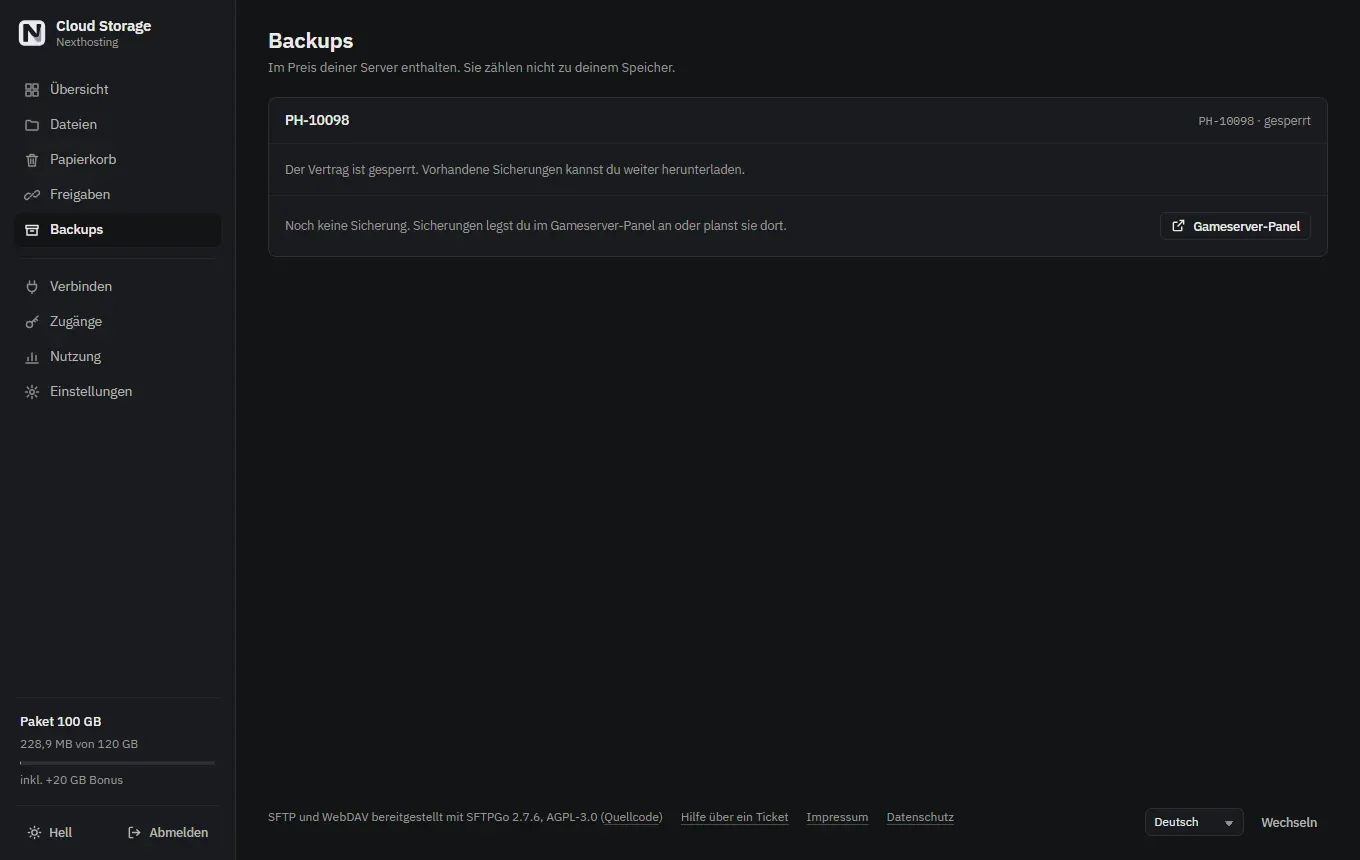
The Backups page. In the example, the server’s contract is locked: existing backups can still be downloaded, but no new ones are created.
- Note: the backups are included in the price of your servers and do not count toward your storage
- One entry per server with its status
- Game server panel (Gameserver-Panel): this is where you create or schedule backups
How game server backups work in the game server panel is explained in Game server backups and databases. If a contract is locked, you can still download existing game server backups. For a paused server, new backups are only created again once it is running.
Move files from Webspace to storage
Section titled “Move files from Webspace to storage”If you have Webspace at Nexthosting, you can copy large folders directly into your storage, such as uploads or videos. The panel guides you in three steps: choose the website, choose the folder, choose the destination in the storage. The copy keeps running in the background even if you close the page. Your website backups run as before and are included in Webspace; moving files out is meant for additional space.
Optionally, in the third step you can tick Danach auf dem Webspace löschen (Then delete on the Webspace). It is off by default; you confirm it with the name of the folder, and nothing is ever deleted in the root folder of the website. The deletion is final, so when in doubt copy without deleting first and check the result in the storage. More about Webspace backups in Backups and restore.
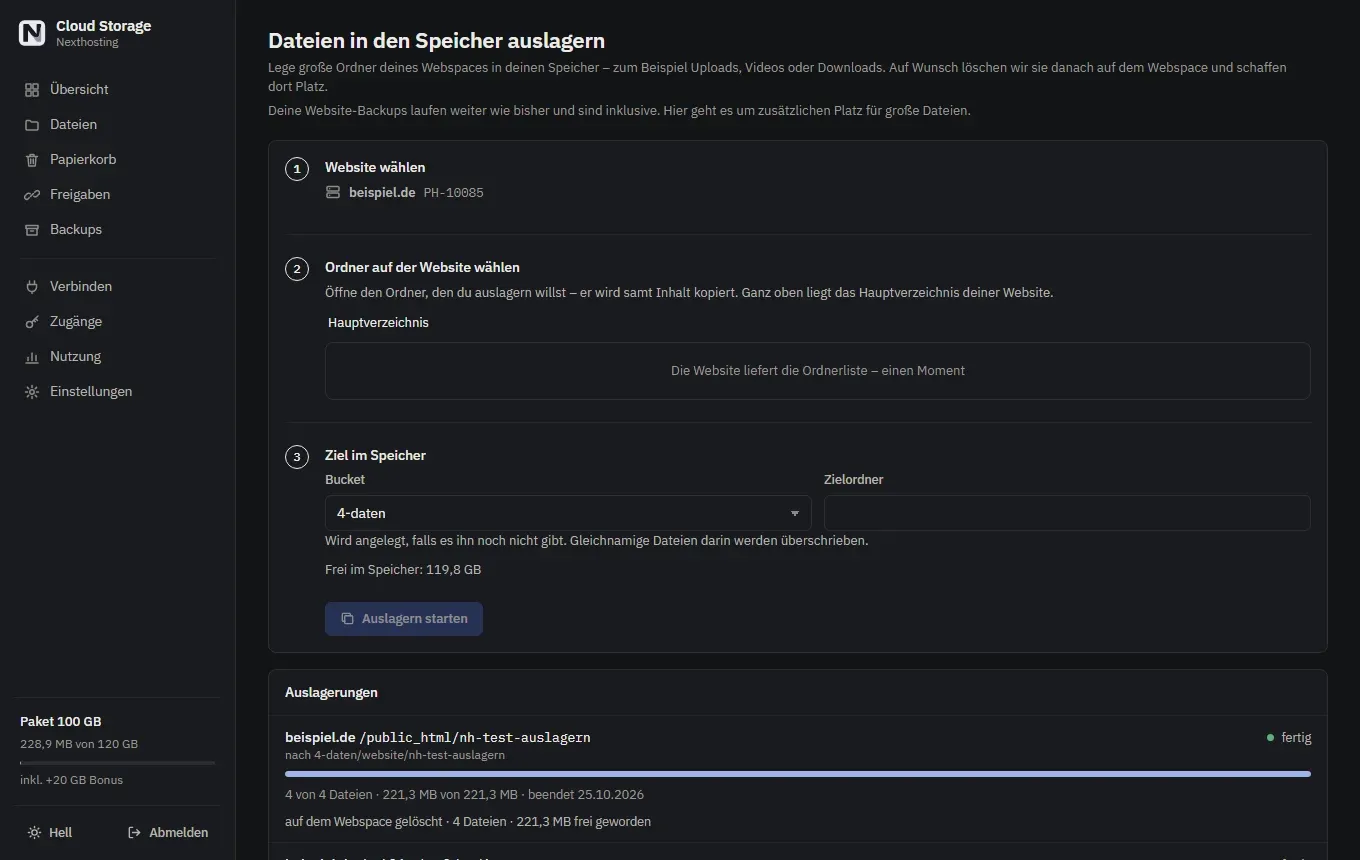
Moving files in three steps, with the previous transfers below.
- Choose the website
- Choose the folder on the website
- Destination in storage: bucket and target folder
- Start offloading (Auslagern starten)
- List of transfers with progress and result
What happens on cancellation or late payment?
Section titled “What happens on cancellation or late payment?”After deletion the files are gone. Download them beforehand, fastest with rclone (rclone copy nexthosting:mein-bucket ./sicherung).
Frequently asked questions
Section titled “Frequently asked questions”Are my files “backed up twice”?
Section titled “Are my files “backed up twice”?”They are stored with multiple redundancy, but not twice in two places. There is no additional copy in a second data center.
Can I get back an older version of a file?
Section titled “Can I get back an older version of a file?”Only from the Trash, and only for 7 days. There are no older versions beyond that. If you need a longer history, use a backup program such as restic, which creates its own snapshots.
Where is my storage located?
Section titled “Where is my storage located?”In a data center in Germany. We do not give location details here.
Who can see my files?
Section titled “Who can see my files?”You decide who gets access: through accesses, share links and memberships. You can revoke accesses and switch off share links at any time. How we handle personal data is explained in Data protection and DPA.