

03Game server panel
Upgrade your game server or book a boost
More RAM, storage and CPU for your Nexthosting game server – permanently with "Server erweitern" or temporarily with a boost. Prices and process.
In short
If your server needs more power permanently, you book Server erweitern (upgrade server) in the customer account: more RAM, storage or CPU cores on top of your plan. If you only need more temporarily – for an event or every weekend, say – you take a boost. You pay for both immediately from your balance or with a payment method that confirms instantly.
Upgrade or boost?
Section titled “Upgrade or boost?”| Server erweitern (upgrade) | Boost | |
|---|---|---|
| Duration | permanent, runs with the contract | chosen period, also recurring |
| What increases | RAM, storage, CPU cores | Upper limits for RAM and CPU, by a percentage |
| Storage | yes | no |
| Price | fixed surcharge per month | by plan, strength and duration, with a minimum price |
| Payment | pro rata immediately, then with the contract invoice | in advance |
| Where to book | Customer account, the server’s contract page | Customer account; boost card also in the panel |
How do I know I need more power?
Section titled “How do I know I need more power?”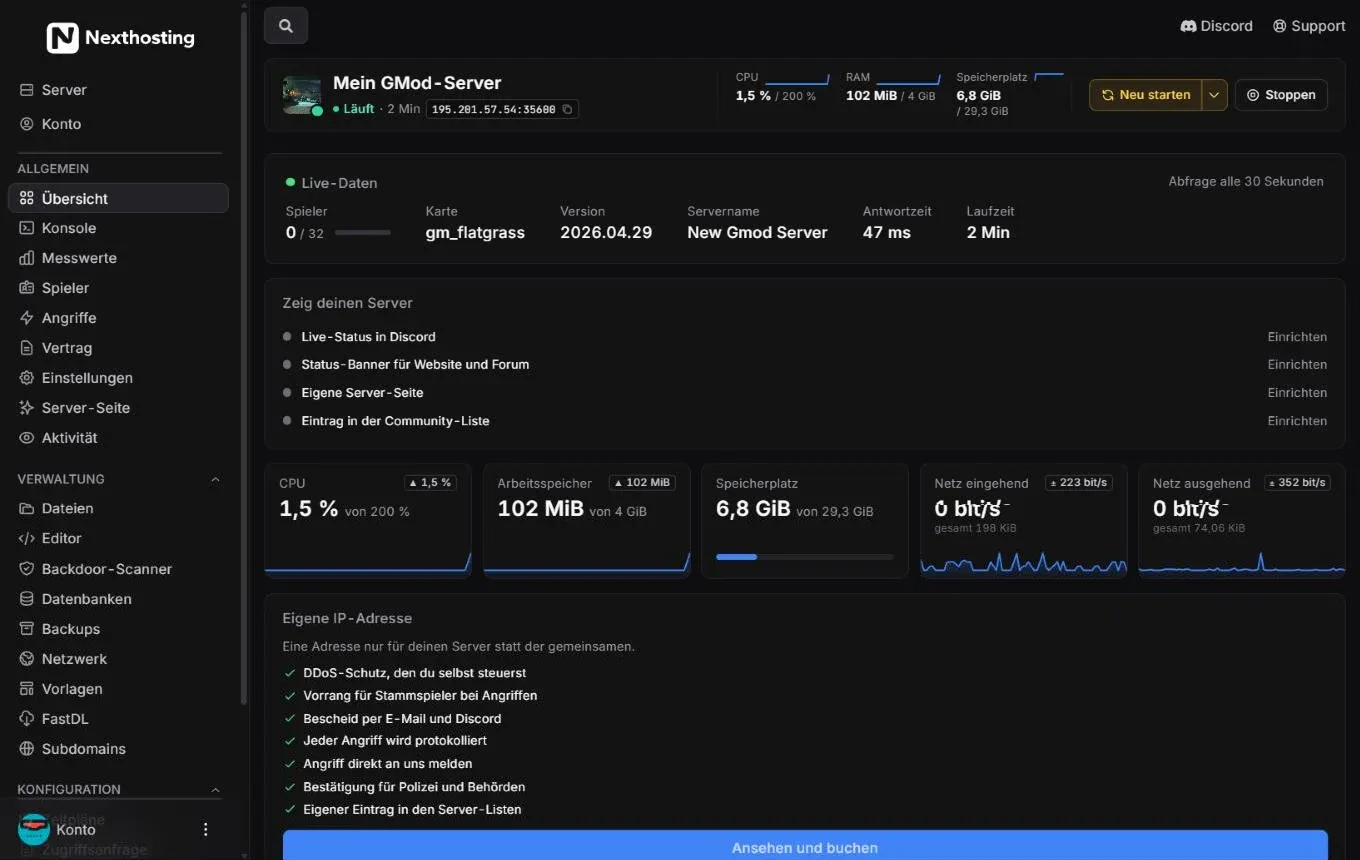
In the header and the tiles you see the current load and your plan’s upper limit.
- CPU, RAM and storage in the header, each with its limit
- Tiles with the current value and history
- Vertrag (contract) – plan, price and history of your server
Signs of too little power:
- RAM sits at the limit for a long time, the server crashes or is shut down.
- With many players the CPU is permanently at its limit and the game stutters.
- Storage is almost full, and backups or updates fail.
The metrics show more precise values over days. If your server is permanently at the limit, the panel shows a notice on the overview.
Upgrade your server
Section titled “Upgrade your server”With Server erweitern you book more power permanently on top of your plan, individually or combined. The plan stays the same, only the upper limits rise.
| Upgrade | Price per month (as of October 2026) |
|---|---|
| RAM | €1.75 per GB |
| Storage | €0.99 per 5 GB |
| CPU | €2.49 per core |
What counts is the price shown to you before booking. You see the upper limits per server there as well.
- Log in to the customer account and open your game server’s contract.
- Choose Server erweitern.
- Set how much extra RAM, storage and CPU you want. The price is shown immediately.
- Pay the pro-rata amount for the rest of the current billing period – from your balance or with a payment method that confirms instantly.
- Once payment arrives, the upgrade is set up.
How billing works
Section titled “How billing works”- Now: pro rata for the remaining days (one thirtieth of the monthly surcharge per day), at least €1.00.
- From the next invoice: the surcharge is part of your contract price.
- Not possible with purchase on invoice, bank transfer or direct debit.
A boost raises the upper limits for RAM and CPU by a percentage for a chosen period. Storage, backups, databases and ports stay the same, and your contract does not change.
- Open the boost in the customer account next to your game server or via the boost card in the panel.
- Choose strength and duration. The price depends on your plan, the strength and the duration; a minimum price applies.
- Pay in advance – from your balance or with a payment method that confirms instantly. The boost starts as soon as payment is in.
Schedule and repeat a boost
Section titled “Schedule and repeat a boost”- Schedule for later: a scheduled boost is paid from your balance when it begins. Until then you can withdraw it in the customer account.
- Recurring: for example every weekend. Each occurrence is paid individually from your balance. If the balance is not enough, that occurrence does not take place – no debt arises from it. You get an email reminder beforehand. Topping up your balance: see Balance and automatic renewal.
The “Vertrag” page in the panel
Section titled “The “Vertrag” page in the panel”Under Vertrag in the panel you see your server’s plan, price and history – as the shop records them: the price breakdown (for example upgrades, dedicated IP address, boost, discounts), the next renewal and what changed when. Only the owner sees this page. If the shop knows no contract of your account for this server, it says “Zu diesem Server kennt der Shop keinen Vertrag deines Kontos.” (the shop knows no contract of your account for this server).
Frequently asked questions
Section titled “Frequently asked questions”Does the upgrade take effect immediately?
Section titled “Does the upgrade take effect immediately?”Yes, it is set up as soon as payment has arrived. Restarting the server helps make sure the game reliably uses the additional RAM.
What happens to a running boost if I upgrade?
Section titled “What happens to a running boost if I upgrade?”From the upgrade on, the boost applies to the new, higher upper limits.
Can I upgrade a prepaid server?
Section titled “Can I upgrade a prepaid server?”The terms talk about the running game server plan and the regular contract invoice. Whether the option appears for you, you can see on your server’s contract page.