

02Account & billing
Paying at Nexthosting – payment methods at a glance
Which payment methods Nexthosting offers, when your server starts after payment, why SEPA direct debit takes longer and what you can use credit for.
In short
You can pay with PayPal, credit card, Klarna, SOFORT, bank transfer, Apple Pay, Google Pay and SEPA direct debit. Business customers can also buy on invoice. Checkout shows which methods are available for your order. Your product is only set up once the payment has arrived – immediately for methods that confirm instantly, later for bank transfer and direct debit.
Payment methods and when things start
Section titled “Payment methods and when things start”| Payment method | Who can use it | When does your product start? |
|---|---|---|
| PayPal | everyone | as soon as PayPal confirms the payment, usually immediately |
| Credit card | everyone | as soon as the payment is confirmed, usually immediately |
| Apple Pay, Google Pay | everyone | as soon as the payment is confirmed, usually immediately |
| Klarna | everyone | as soon as Klarna confirms the payment |
| SOFORT | everyone | as soon as the payment is confirmed |
| Bank transfer (Überweisung) | everyone | only when the money has arrived at Nexthosting – depending on your bank, a few hours to a few bank working days |
| SEPA direct debit (SEPA-Lastschrift) | everyone, if offered at checkout | only when the debit is confirmed – in our experience about 12–13 days |
| Purchase on invoice (Kauf auf Rechnung) | business customers only | as stated at checkout |
| Credit (Guthaben) | everyone with credit in the customer account | immediately |
Checkout decides which payment methods are actually available for your order (AGB § 7; AGB = General Terms and Conditions). If a payment method is not available to you, the order with that method is rejected – choose another one then.
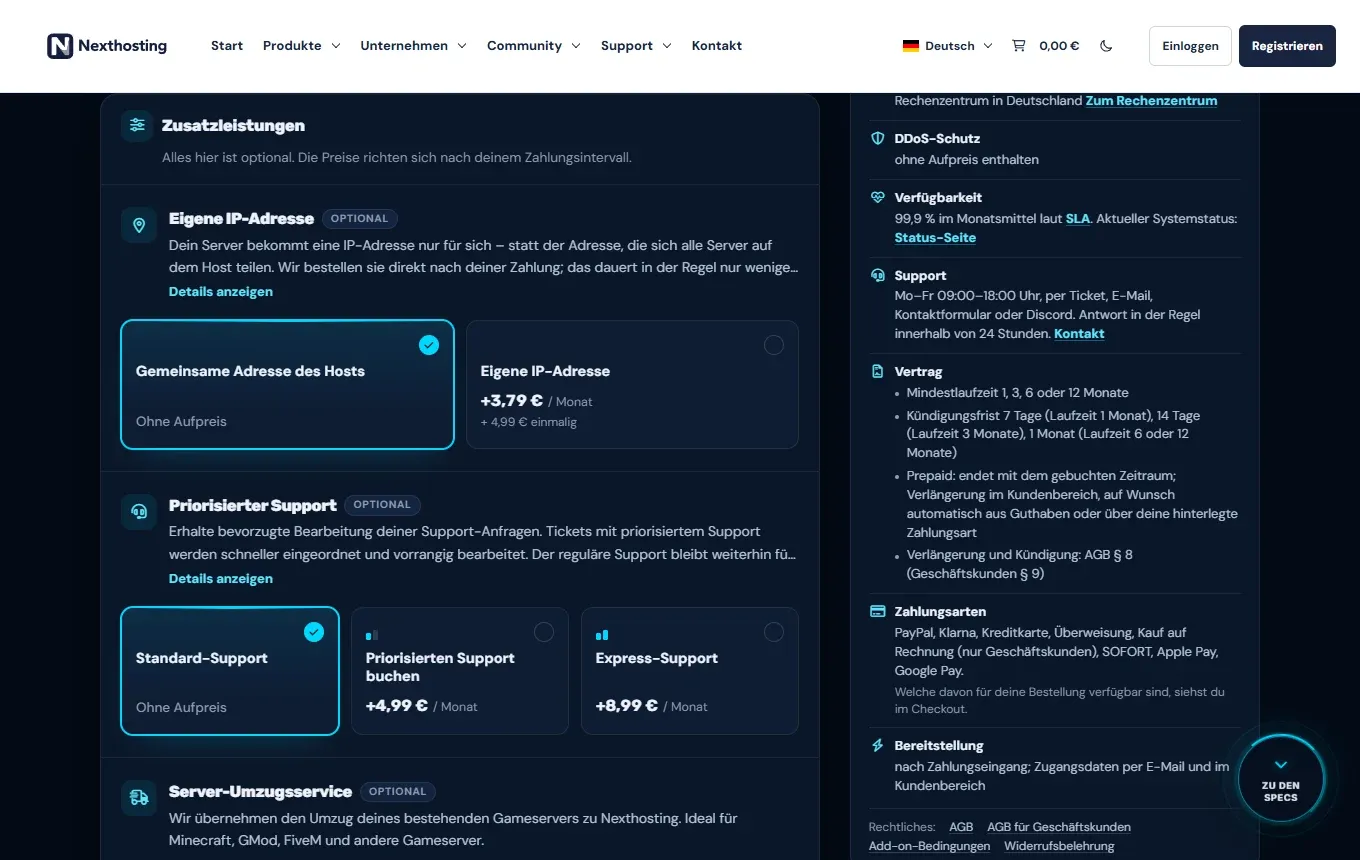
On every product page, the payment methods and the note on provisioning are shown on the right.
- Payment methods for this product
- Provisioning after payment arrives, the product appears in the customer account under Deine Produkte
Prices and VAT
Section titled “Prices and VAT”All prices shown are final prices. Nexthosting is a small business under § 19 UStG (German VAT Act): no VAT is added, none is shown on the invoice, and so you cannot deduct input VAT. What counts is the information in the order process.
SEPA direct debit: why it takes time
Section titled “SEPA direct debit: why it takes time”With a direct debit, Nexthosting collects the money from your bank account. It takes several bank working days until the bank finally confirms the debit. Only then is the payment considered received, and only then is your product set up.
- OrderChoose SEPA direct debit at checkout
- Debit submittedThe customer account says the debit is in progress, with the expected date
- Waitin our experience about 12–13 days
- Debit confirmedPayment counts as received
- Product is set up
During this time you receive emails about the status of the debit. If it is not honoured, for example because of insufficient funds, the product is not set up and you are informed by email. The customer account then says the debit was not honoured.
When you need credit or an instant payment
Section titled “When you need credit or an instant payment”For some bookings after the order, Nexthosting only accepts credit or a payment method that confirms the payment immediately. Purchase on invoice, bank transfer and direct debit do not work for these:
- a boost (more performance for a limited time),
- expanding your server (permanently more RAM, storage, CPU) – the pro-rata amount for the current period,
- an own IP address booked later.
Scheduled and recurring boosts are always paid from credit. More about credit in Credit and automatic renewal.
Storing a payment method
Section titled “Storing a payment method”You need a stored credit card or a SEPA direct debit mandate for two functions:
- the automatic renewal of prepaid products when your credit is not enough,
- pausing a game server (alternatively, a minimum credit balance is enough, currently €10).
You find your payment agreements in the customer account in the finance area under Mandate (mandates). For prepaid renewal, you switch the automation on from the overview with Automatische Verlängerung einschalten (“turn on automatic renewal”).
Paying open invoices
Section titled “Paying open invoices”You pay invoices for renewals in the customer account under Deine Rechnungen (your invoices). If you have several open invoices, you can also settle them with a single payment. How that works is explained in Invoices.
Frequently asked questions
Section titled “Frequently asked questions”Is my service suspended with direct debit when the invoice is due?
Section titled “Is my service suspended with direct debit when the invoice is due?”No. As long as a collection via your mandate is in progress, nothing is suspended. The deadlines for reminder and suspension only start when the collection fails (AGB § 7). See Payment default and suspension.
Why is my server not there yet after the bank transfer?
Section titled “Why is my server not there yet after the bank transfer?”A bank transfer first has to arrive in Nexthosting’s account and be matched. Enter the payment reference exactly as shown at checkout or on the invoice. If the money has not arrived after a few bank working days, open a ticket.
Do I get an invoice with VAT?
Section titled “Do I get an invoice with VAT?”No. As a small business under § 19 UStG, Nexthosting does not show any VAT.