

03Game server panel
Backdoor scanner and player management in the panel
Check your Nexthosting Garry's Mod server for backdoors with the backdoor scanner and manage players in the panel – kick, ban, send messages.
In short
The Backdoor-Scanner (backdoor scanner) checks your server’s Lua files for hidden backdoors – once with a click or automatically every 24 hours. Under Spieler (players) you see who is online and can kick, ban and unban players and send them messages. Both tools exist for Garry’s Mod; the menu adapts to the game.
Backdoor scanner
Section titled “Backdoor scanner”A backdoor is hidden code in an addon through which outsiders can control your server – for example give themselves admin rights, ban players or delete files. Such addons mostly come from unofficial sources (“leaked” paid addons).
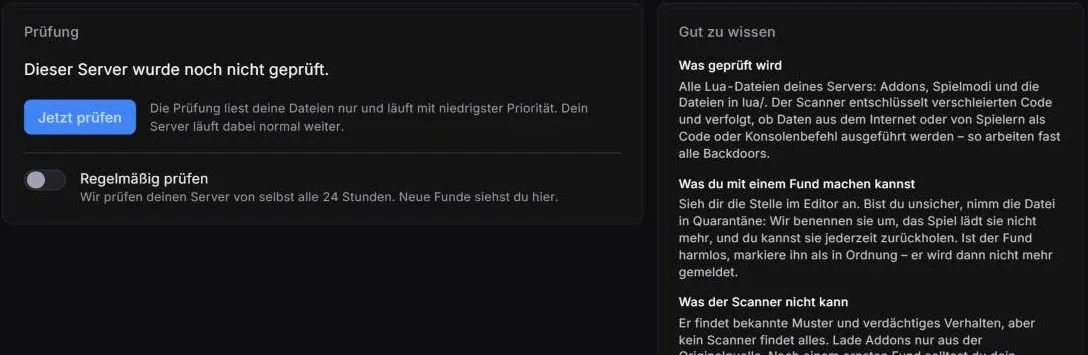
The scanner before the first check.
- Result of the last check, here “Dieser Server wurde noch nicht geprüft.” (this server has not been checked yet)
- Jetzt prüfen (“check now”)
- Switch Regelmäßig prüfen (check regularly) – automatically every 24 hours
- Gut zu wissen (good to know) – what is checked, what you can do with a finding, limits
What is checked
Section titled “What is checked”The scanner reads all Lua files on your server: addons, game modes and the files in lua/. It decodes obfuscated code and traces whether data from the internet or from players is executed as code or as a console command – that is how almost all backdoors work.
The check only reads your files and runs at the lowest priority. Your server keeps running normally meanwhile.
- Open Backdoor-Scanner in the Verwaltung (management) group.
- Click Jetzt prüfen and wait until the check has finished.
- Switch on Regelmäßig prüfen. Nexthosting then checks your server every 24 hours, and you see new findings on this page.
What you can do with a finding
Section titled “What you can do with a finding”- Look at the findingOpen the spot in the editor
- Genuine or harmless?
- QuarantineFile is renamed, the game does not load it
- Mark as fineno longer reported
- Look at it: open the reported spot in the editor.
- Quarantine: if you are unsure, put the file in quarantine. It is renamed, the game no longer loads it, and you can bring it back at any time.
- Fine: if the finding is harmless, mark it as fine. It is then no longer reported.
Player management
Section titled “Player management”
Before you can use it, you switch on player management once.
- Spielerverwaltung einschalten (“switch on player management”)
With player management you see in the panel who is on your server and can kick, ban, unban players and send them messages – without being in the game yourself.
How it works
Section titled “How it works”So that the panel can talk to the game, it places a small Lua file in your server:
garrysmod/lua/autorun/server/nexthosting_panel.luaIt writes the values to a file in your server folder every five seconds, sends nothing to the internet and can be removed at any time. No restart is needed.
- Open Spieler in the Allgemein (general) group.
- Click Spielerverwaltung einschalten.
- After a few seconds you see the players who are online right now.
Player management works together with common admin mods: SAM, ULX/ULib and FAdmin. If none of them is installed, it uses a list of its own. The easiest way to set up an admin mod is the ULX Admin-Mod template – see Templates, mods and modpacks.
More tools in the panel
Section titled “More tools in the panel”| Tool | Where | |
|---|---|---|
| Metrics with export | Messwerte (metrics) | Metrics |
| Editor with collaborative editing | Editor | Files and editor |
| FastDL with a join-time calculator | FastDL | FastDL |
| Tidy up Workshop storage | Einstellungen (settings) | Settings |
Frequently asked questions
Section titled “Frequently asked questions”Does the scanner slow down my server?
Section titled “Does the scanner slow down my server?”No. It runs at the lowest priority and only reads the files.
The scanner flags an addon I got from the Workshop.
Section titled “The scanner flags an addon I got from the Workshop.”Workshop addons can also load code that looks suspicious, for example for updates. Look at the spot. If you are unsure, put the file in quarantine and ask the addon’s developer.
How do I switch player management off again?
Section titled “How do I switch player management off again?”You can remove the Lua file at any time under Spieler. Alternatively, delete garrysmod/lua/autorun/server/nexthosting_panel.lua in the file manager. No restart is needed.