

03Game server panel
Game server ports, custom domain and subdomain
Manage the ports of your Nexthosting game server, generate DNS records for your own domain and set up a free subdomain under nexthosting.app.
In short
Under Netzwerk (network) you see your server’s address and ports and generate DNS records that point your own domain at the server. Under Subdomains you set up a free address like meinserver.nexthosting.app. Your players then no longer have to remember an IP address.
The “Netzwerk” page
Section titled “The “Netzwerk” page”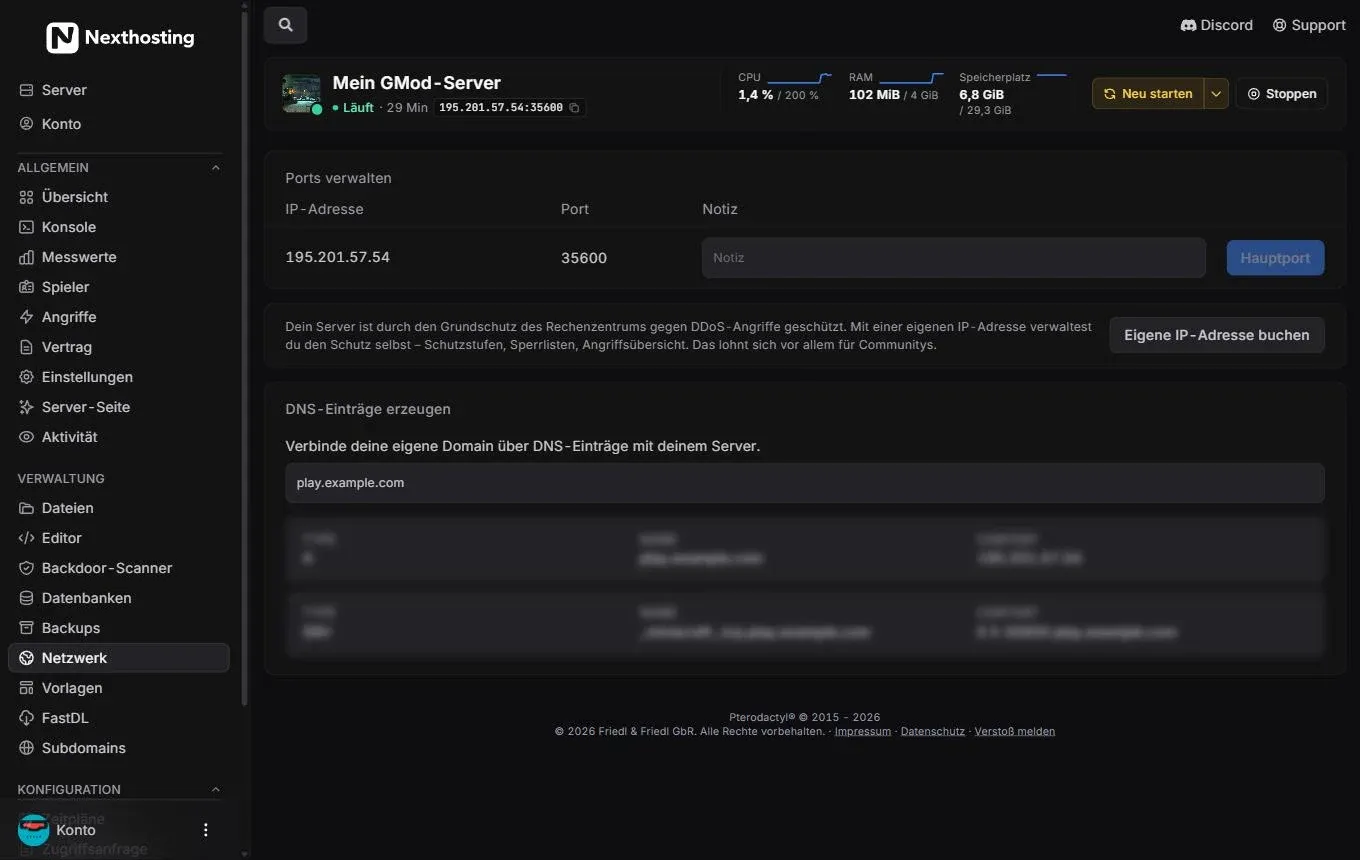
Ports, the DDoS notice and the generator for DNS records.
- Ports verwalten (manage ports) – all ports of your server
- IP address and port
- Notiz (note) – your own description of what a port is for
- Hauptport (main port) – your players connect through this port
- Eigene IP-Adresse buchen (“book a dedicated IP address”)
- DNS-Einträge erzeugen (generate DNS records)
- Field for your domain, for example
play.example.com - Preview of the finished records (A and SRV)
Every server has at least one port, the Hauptport (main port). The game is reachable through it – together with the IP address it forms the address you give your players, for example 195.201.57.54:35600.
Some plans include additional ports, the port allocations. You need these, for example, for a query interface, a voice plugin or a web map. How many there are is stated in the plan description in the shop (for Minecraft, for example, 2 in the Basic plan and 10 in the Community plan, as of October 2026). With the Notiz you record what a port is meant for.
DDoS basic protection
Section titled “DDoS basic protection”The notice in the middle is a reminder: your server is protected against DDoS attacks by the data centre’s basic protection. With a dedicated IP address you manage the protection yourself – protection levels, block lists, attack overview. More on this under DDoS protection and attacks.
Connect your own domain
Section titled “Connect your own domain”With DNS-Einträge erzeugen (generate DNS records) you connect your own domain to your server. The panel shows you exactly the records you need to create at your domain provider.
- Open Netzwerk and scroll to DNS-Einträge erzeugen.
- Enter the address you want, for example
play.your-domain.com. - The panel shows the matching records – an A record (name → IP address) and, depending on the game, an SRV record (redirects to the right port).
- Create exactly these records in the DNS management of your domain.
- Wait until the records take effect. This usually takes minutes, sometimes a few hours.
An example of how this looks for Minecraft:
play.your-domain.com. A 195.201.57.54_minecraft._tcp.play.your-domain.com. SRV 0 5 35600 play.your-domain.com.With the SRV record, your players in Minecraft only have to enter play.your-domain.com, without a port. Many other games do not support SRV records – there players enter the domain with the port, i.e. play.your-domain.com:35600.
The detailed guide with examples for different providers is under Connect a domain to a game server. The basics of DNS are explained in DNS basics.
Free subdomain under nexthosting.app
Section titled “Free subdomain under nexthosting.app”No domain of your own? Then take a free subdomain under .nexthosting.app.
- Open Subdomains in the sidebar under Verwaltung (management).
- Choose a free name, for example
myclan. - Save. Your server is then reachable at
myclan.nexthosting.app.
You can change the name later. Tell your players when you do, because the old address no longer works afterwards.
Frequently asked questions
Section titled “Frequently asked questions”My domain does not point to the server. What can I do?
Section titled “My domain does not point to the server. What can I do?”Check whether you created the records exactly as the panel shows them and whether the name is correct. New records sometimes need a little time. Help with troubleshooting is under Solve DNS problems.
Will my IP address ever change?
Section titled “Will my IP address ever change?”Normally not. It does change, however, if you book or give up a dedicated IP address, or if you pause a server with a dedicated address. Then adjust the A record of your domain and check your subdomain.
Do I need additional ports for plugins?
Section titled “Do I need additional ports for plugins?”Only for plugins that offer a service of their own, for example a web map. Most plugins run through the main port.