

03Game server panel
DDoS protection and attacks on your game server
How Nexthosting protects your game server from DDoS attacks, what the Attacks page in the panel shows, and what you can configure yourself with a dedicated IP.
In short
Every game server at Nexthosting is protected against DDoS attacks at no extra charge by the data centre’s basic protection (Grundschutz). Under Angriffe (attacks) in the panel you see your server’s protection status and network traffic. With a dedicated IP address you additionally get a filter just for your server, which you configure yourself in the protection panel.
What is a DDoS attack?
Section titled “What is a DDoS attack?”In a DDoS attack (Distributed Denial of Service), many machines send so much traffic to a server at the same time that real players can no longer get through. For players this looks like lag, dropped connections or a server that disappears from the list.
The “Angriffe” page
Section titled “The “Angriffe” page”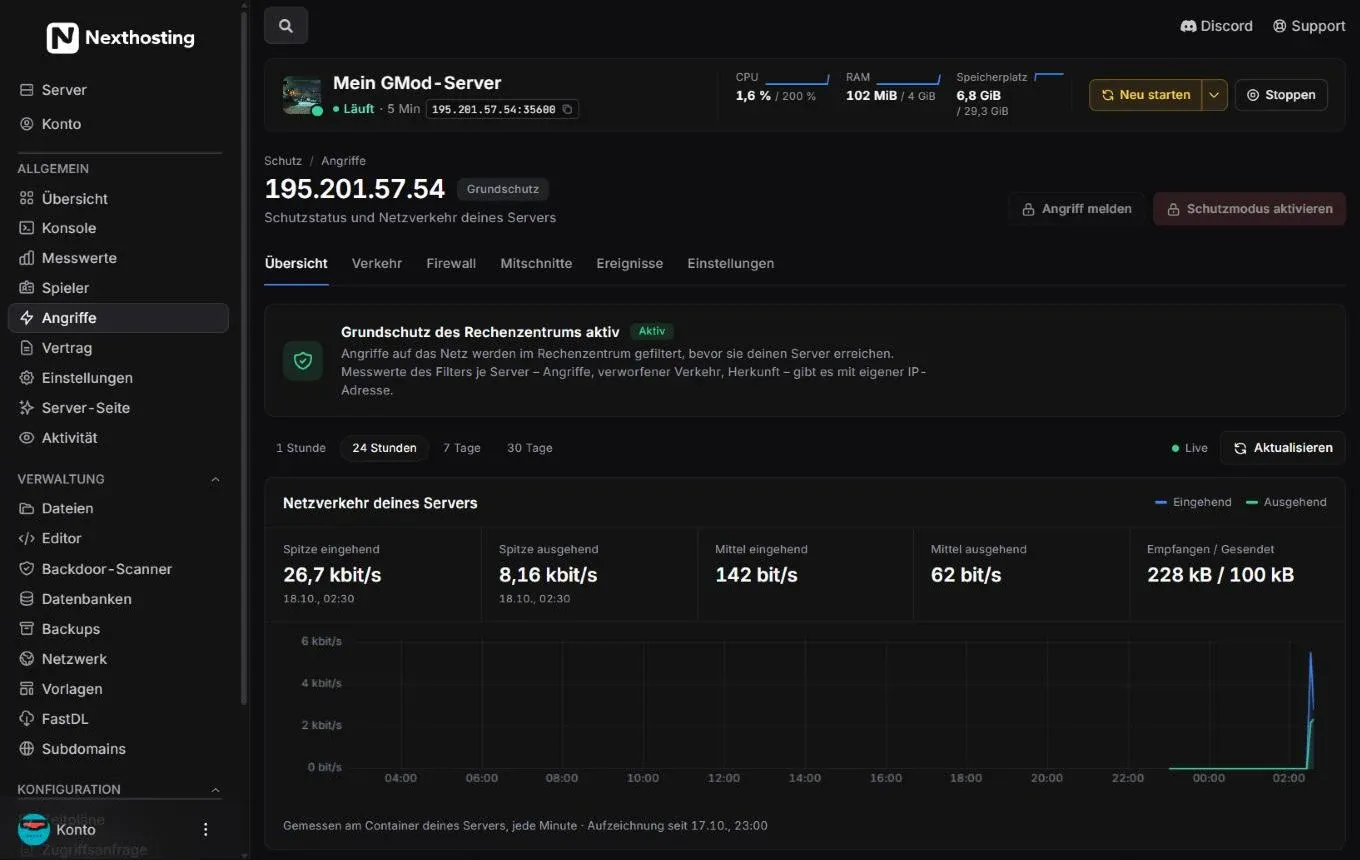
The “Schutz / Angriffe” (protection / attacks) page of a server without a dedicated IP address.
- Your server’s address with the current type of protection, here Grundschutz (basic protection)
- Tabs Übersicht (overview), Verkehr (traffic), Firewall, Mitschnitte (captures), Ereignisse (events), Einstellungen (settings)
- Angriff melden (“report attack”)
- Schutzmodus aktivieren (“activate protection mode”)
- Notice Grundschutz des Rechenzentrums aktiv (data centre basic protection active)
- Time range: 1 hour, 24 hours, 7 days, 30 days
- Live display and Aktualisieren (“refresh”)
- Netzverkehr deines Servers (your server’s network traffic): peak in and out, averages, received / sent
- Type of measurement: at your server’s container, every minute
Your server’s network traffic
Section titled “Your server’s network traffic”The chart shows how much data arrives at your server (incoming) and leaves it (outgoing). Above it are the peaks with their time, the averages and the total for the selected time range. Measurements are taken at your server’s container, every minute.
A normal gaming evening gives a calm line that rises and falls with the number of players. A sudden, very high spike without new players can be an attack.
Without a dedicated IP address
Section titled “Without a dedicated IP address”Without a dedicated IP address, your server shares the address with other servers on the same host. The basic protection filters attacks on the data centre’s network before they reach your server. Per-server filter measurements – attacks, dropped traffic, origin – only exist with a dedicated IP address, though. That is why these parts of the page are blurred, and the buttons Angriff melden and Schutzmodus aktivieren carry a lock.
Basic protection and dedicated IP compared
Section titled “Basic protection and dedicated IP compared”| Basic protection (every server) | With a dedicated IP address | |
|---|---|---|
| Cost | included in the plan | €3.79 per month + €4.99 one-time (as of October 2026) |
| Address | shared with other servers on the host | belongs to your server alone |
| Attack on another server | hits the shared address, so you too | does not hit you |
| Filter of your own | no | yes, only for your address |
| Choose protection levels yourself | no | normal, streng (strict), angriff (attack) |
| Regular players preferred | no | yes, remembered for 30 days |
| Block countries, block list and allow list | no | yes |
| Notification by email and Discord | no | yes |
| Report an attack with a report | via support request | via button, with a PDF report |
Prices in the shop. Everything about booking is under Dedicated IP address.
With a dedicated IP: Nexthosting Schutz
Section titled “With a dedicated IP: Nexthosting Schutz”Every dedicated IP address includes, at no extra charge, access to Nexthosting Schutz (protection) at schutz.nexthosting.net. You do not log in there with a password but get in via a link from your account or from the panel (“In der Schutz-Zentrale öffnen” – open in the protection centre).
There you can, among other things:
- choose between three protection levels: normal, streng (strict) and angriff (attack) – and have the protection tightened automatically during an attack,
- choose a game profile that fits your game,
- put senders on a block list or allow list,
- block countries or allow only certain countries (automatically during an attack only if you switch that on),
- protect regular players: anyone who has been on your server for a while is remembered for 30 days and gets in preferentially even during an attack,
- be notified by email and Discord when an attack begins and ends,
- check the filter with Schutz testen (test protection),
- invite co-managers, for example admins of your community (they need a customer account of their own),
- view the traffic per port and export reports as PDF or spreadsheet.
In the panel, Schutzmodus aktivieren switches directly to the strictest level when an attack is under way.
An attack is under way – what now?
Section titled “An attack is under way – what now?”- Check the network traffic under Angriffe. If it rises sharply without players joining, an attack is likely.
- With a dedicated IP: click Schutzmodus aktivieren.
- Report the attack. With a dedicated IP you do this with Angriff melden: a support request is created in your name with an automatic analysis; after the attack ends, a comprehensive report follows. On request there is a confirmation you can submit to the police or other authorities.
- Without a dedicated IP: make a support request with the time and a description. See Support.
Frequently asked questions
Section titled “Frequently asked questions”My server lags. Is that an attack?
Section titled “My server lags. Is that an attack?”Not necessarily. A full CPU or full RAM is more common. First check the metrics. If everything is calm there but the network traffic under Angriffe is very high, that points to an attack.
How do I know who is attacking me?
Section titled “How do I know who is attacking me?”Sender addresses in DDoS attacks are often forged. With a dedicated IP address, the protection panel shows the strongest senders and their countries of origin – but that is not a determination of who triggered the attack.
How long is attack data kept?
Section titled “How long is attack data kept?”Measurements in the protection panel for 30 days, attack records for up to two months.