

03Game server panel
Game server metrics and crash notifications
View and export your Nexthosting game server's metrics up to 30 days back, and get notified by email or Discord when your server crashes.
In short
Under Messwerte (metrics) you see how heavily your server uses CPU, RAM and network and how many players were online – live and up to 30 days back. Under Einstellungen → Benachrichtigungen (settings → notifications) you set it up so you are told by email or Discord when your server is shut down unexpectedly.
The “Messwerte” page
Section titled “The “Messwerte” page”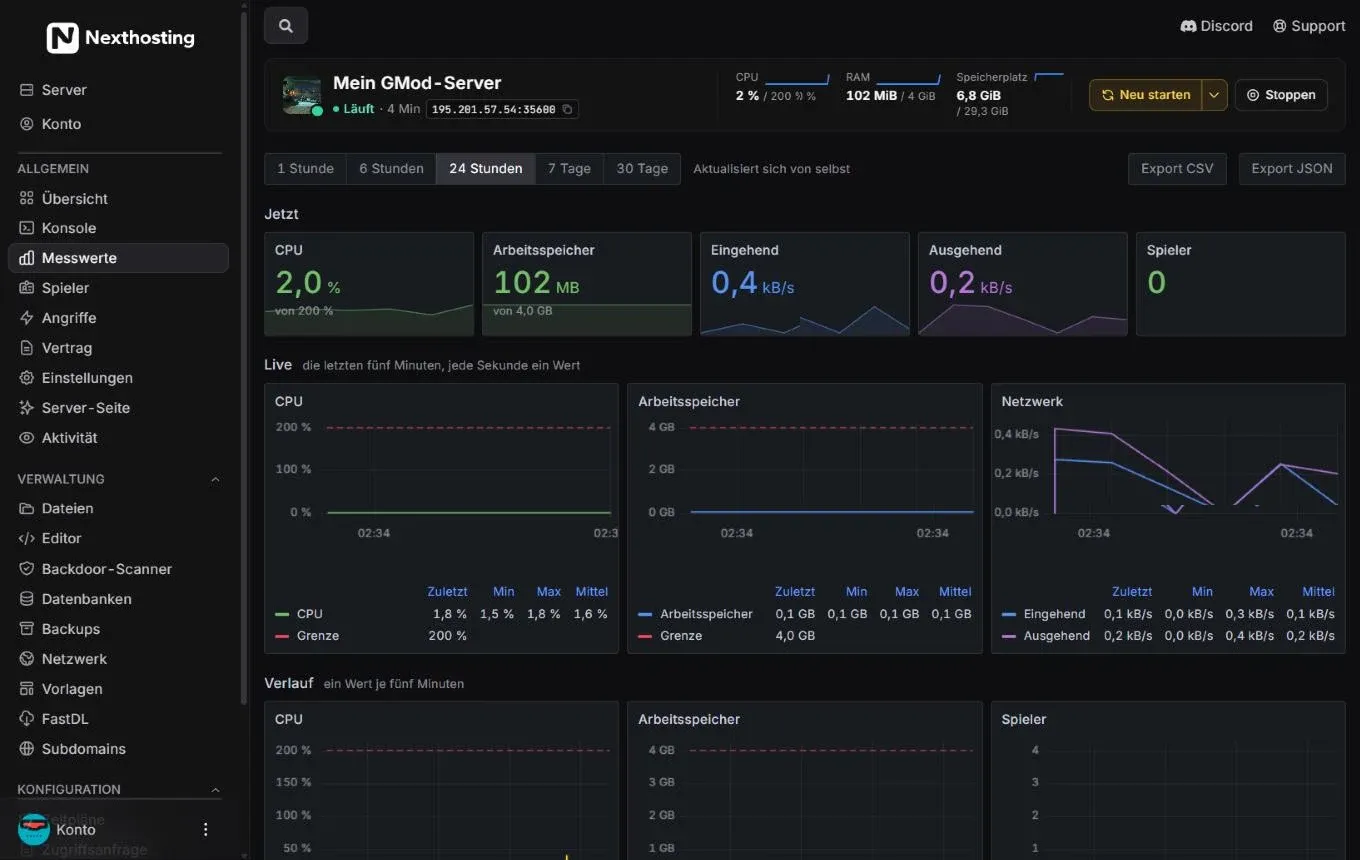
Metrics with live charts. The red dashed line is your plan’s limit.
- Time range: 1 Stunde (1 hour), 6 Stunden, 24 Stunden, 7 Tage (7 days), 30 Tage – the page updates by itself
- Export CSV and Export JSON
- Jetzt (now) – current values for CPU, Arbeitsspeicher (RAM), Eingehend (incoming), Ausgehend (outgoing) and players
- Live – the last five minutes, one value per second
- Grenze (limit) – your plan’s upper limit
- Zuletzt (last), Min, Max, Mittel (average) for each line
- Verlauf (history) – one value per five minutes over the selected time range
How to read the charts
Section titled “How to read the charts”| Chart | What it shows | What to look out for |
|---|---|---|
| CPU | Processor load in %; 100 % = one core | If the line stays at the limit for long, the game stutters (lag). |
| RAM (Arbeitsspeicher) | RAM in use | If it hits the limit, the system may shut the server down. |
| Network (Netzwerk) | Data in and out | Sudden high spikes without players can point to an attack. |
| Players (Spieler) | Players online | Shows when most is going on – useful for choosing restart times. |
Export
Section titled “Export”With Export CSV you download the metrics of the selected time range as a table, for example for Excel or LibreOffice. Export JSON is meant for your own analyses and programs.
How long are metrics kept?
Section titled “How long are metrics kept?”Nexthosting keeps fine-grained values for 48 hours, hourly values for 35 days and events for 30 days. That is why the longest range in the panel goes back 30 days. More on data protection is under Privacy and DPA.
Notifications on crashes and high load
Section titled “Notifications on crashes and high load”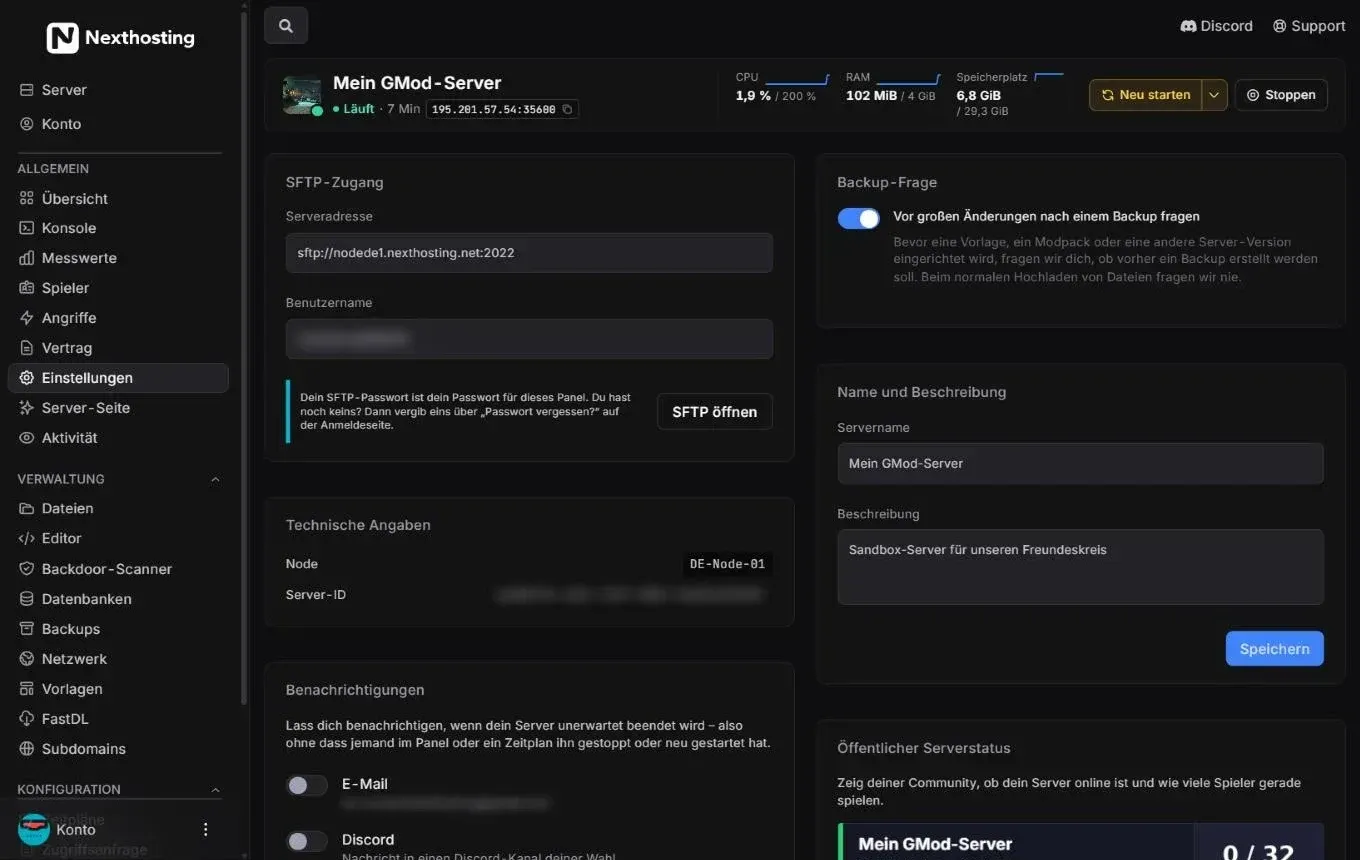
You find the notifications under Einstellungen (settings).
- Benachrichtigungen (notifications) with the switches E-Mail and Discord
The panel gets in touch when your server is shut down unexpectedly – that is, without anyone in the panel or a schedule having stopped or restarted it. The notification is optional; you switch it on yourself.
- Open Einstellungen and scroll to Benachrichtigungen.
- Switch on E-Mail if you want an email to the address shown.
- Switch on Discord if a message should go to a Discord channel of your choice, and enter your channel’s webhook address (see below).
- If you like, switch on Auch bei dauerhaft hoher Auslastung (also on persistently high load). You then get at most one message per day per resource.
- Click Testnachricht senden (“send test message”) to check that everything arrives.
Create a Discord webhook
Section titled “Create a Discord webhook”A webhook is an address through which a program may write messages into a Discord channel. You do not need a bot for this.
- In Discord, open the channel’s settings (gear icon next to the channel name).
- Go to Integrations → Webhooks → New Webhook.
- Give it a name, for example “Server watch”, and choose the channel.
- Click Copy Webhook URL and paste the address into the panel.
Frequently asked questions
Section titled “Frequently asked questions”Why does the history show gaps?
Section titled “Why does the history show gaps?”Gaps mean there is no measurement for that time, usually because the server was off.
I get no notification although the server crashed.
Section titled “I get no notification although the server crashed.”Check that the switch is on and the test message arrives. If a schedule or someone in the panel restarted the server, that does not count as unexpected. For email, take a look in your spam folder.
Can I see the metrics of my friends’ servers?
Section titled “Can I see the metrics of my friends’ servers?”You see the metrics of all servers you have access to – as far as the owner has given you the permissions for it.