

07Domains, DNS & SSL
Connect a domain to your game server – subdomain and SRV
Give your Nexthosting game server a memorable address – free subdomain under nexthosting.app, your own domain with an A record, or an SRV record for Minecraft.
In short
Every game server at Nexthosting gets a free subdomain under .nexthosting.app, which you set up in the panel on the Subdomains page. Your own domain works too: for Minecraft you use an SRV record so players do not have to type a port number. For most other games, an A record points to the server and players append the port.
Which option suits you?
Section titled “Which option suits you?”The fastest way: generate DNS records in the panel
Section titled “The fastest way: generate DNS records in the panel”In the game server panel, the Netzwerk (Network) page has a box called DNS-Einträge erzeugen (generate DNS records). You enter your own domain, for example play.example.com, and the panel shows you the matching records to copy: an A record to your server’s address and an SRV record for Minecraft.
- In the panel, open the Netzwerk page of your server.
- Scroll to DNS-Einträge erzeugen and type in the domain or subdomain you want (just the name, e.g.
play.meinprojekt.de). - Copy the records shown (type, name, content) and create them at the provider of your domain (Manage DNS records).
- Wait out the TTL and test the address in the game.
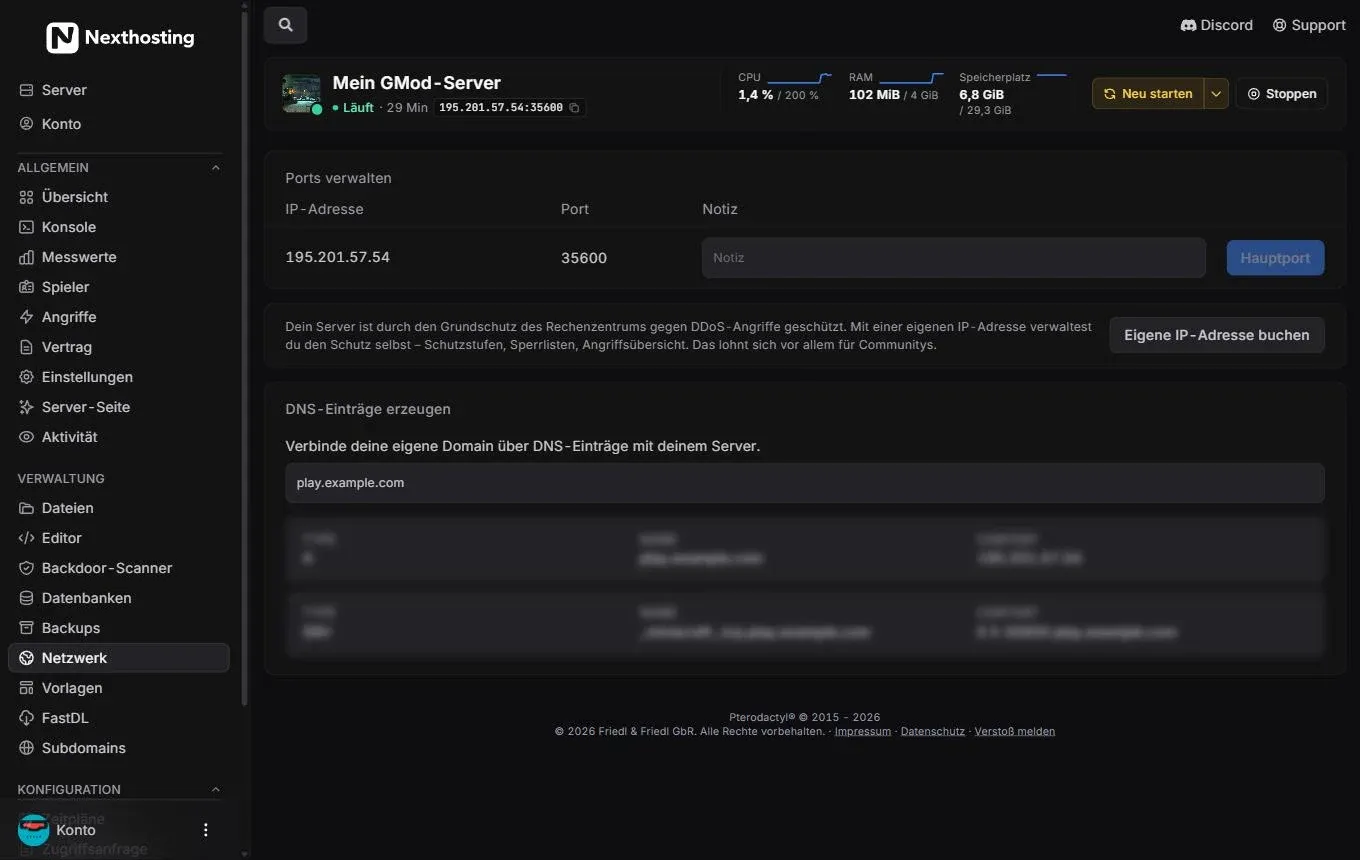
The Netzwerk (Network) page with the domain generator.
- IP address and port of your server (the main port is marked)
- Enter your domain here
- The generated A and SRV records to copy
Free subdomain in the panel
Section titled “Free subdomain in the panel”The game server panel has a Subdomains page. There you set up a free subdomain under .nexthosting.app and can rename it later. Your preferred name becomes an address like meinserver.nexthosting.app. The panel shows you which names are available.
- Open your game server panel at panel.nexthosting.net (Open the panel).
- On the left, under Verwaltung (Management), choose Subdomains.
- Enter the name you want and save.
- Give the new address to your players. If the game needs a port, append it (see below).
More on ports and forwarding: Network, ports and subdomains.
Minecraft: SRV record for your own domain
Section titled “Minecraft: SRV record for your own domain”Normally you type the address and port for a Minecraft server (address:25565). The default port 25565 can be left out. If your server runs on a different port, an SRV record helps. It tells the game: “At mc.meinprojekt.de you will find the server on this host and this port.” That way players can simply enter mc.meinprojekt.de.
On the Minecraft page in the shop you will find a generator that fills in the values for you.
Structure of the SRV record
Section titled “Structure of the SRV record”| Field | Meaning | Example |
|---|---|---|
| Type | SRV | SRV |
| Name | _minecraft._tcp plus the subdomain under which players connect |
_minecraft._tcp.mc |
| Priority | The lower number is used first | 0 |
| Weight | Distribution at equal priority | 5 |
| Port | Port your server runs on | 25565 (your port from the panel) |
| Target | Name that points to the server | meinserver.nexthosting.app |
| TTL | Validity | 3600 |
_minecraft._tcp.mc 3600 IN SRV 0 5 25565 meinserver.nexthosting.app.Read it like this: “For mc.meinprojekt.de: priority 0, weight 5, port 25565, target meinserver.nexthosting.app.”
- Player types mc.meinprojekt.de
- Minecraft looks up _minecraft._tcp.mc.meinprojekt.deSRV query in DNS
- DNS returns target and porte.g. meinserver.nexthosting.app and the port
- Target is resolved to an IP addressA record of the subdomain
- Connection established
Step by step
Section titled “Step by step”- Set up the free subdomain in the panel (see above). It is the target of the SRV record.
- Look up your server’s port in the panel, e.g. on the server overview (address with port). Write the port down.
- Open the DNS area at the provider of your domain (Manage DNS records).
- Create an SRV record: name
_minecraft._tcp.mc(or_minecraft._tcpif the main domain itself should apply), priority 0, weight 5, your port, target your subdomain. Some interfaces ask for service (_minecraft), protocol (_tcp) and name (mc) in separate fields. - Wait out the TTL and test in Minecraft: Multiplayer, Add Server, enter
mc.meinprojekt.de.
More about your server: Minecraft at Nexthosting.
Other games: A record
Section titled “Other games: A record”Most games do not support an SRV record. There you create an A record that points the name to your game server’s IP address, and players append the port.
spiel 3600 IN A 203.0.113.10Example for players: spiel.meinprojekt.de:27015. You can see the address (IP) and port in your panel on the server overview. The IP address above is a documentation example. Instead of an IP address you can also set a CNAME to your subdomain meinserver.nexthosting.app. Then the record stays correct if the address changes:
spiel 3600 IN CNAME meinserver.nexthosting.app.| Game type | Record | Players enter |
|---|---|---|
| Minecraft Java | SRV (no port for players) | mc.meinprojekt.de |
| Games with a default port | A or CNAME | spiel.meinprojekt.de |
| Games with a different port | A or CNAME | spiel.meinprojekt.de:port |
| Games with a server browser (e.g. Steam) | optional | Server is found through the list |
Whether your game needs the port is explained in the respective game guide. With your own IP address, your server has an address of its own. If you give it up later or receive a new one, A records with a fixed IP change; a CNAME to the Nexthosting subdomain, however, stays valid.
Problems?
Section titled “Problems?”| Symptom | Cause | Solution |
|---|---|---|
| “Can’t resolve hostname” | Record missing or wrong name | Check the spelling, wait out the TTL |
| Minecraft does not connect through the domain, but does through the subdomain | SRV record wrong | Check the name _minecraft._tcp and the port |
| Players end up on the old server | Old A record or DNS cache | Delete old records, Solving DNS problems |
| Connection hangs | Port not opened | Check in the panel under Netzwerk (Network) |
Frequently asked questions
Section titled “Frequently asked questions”Does the subdomain cost anything?
Section titled “Does the subdomain cost anything?”The subdomain under .nexthosting.app is free.
Do I need my own domain for Minecraft?
Section titled “Do I need my own domain for Minecraft?”No. The free subdomain is enough. You only need your own domain for a nicer address.
Does the domain also work with Cloudflare?
Section titled “Does the domain also work with Cloudflare?”Yes, but set “DNS only” (grey cloud) for game server records. Game traffic does not run through the Cloudflare proxy.