

03Game server panel
FastDL and loading screen for Garry's Mod servers
Switch on FastDL in the Nexthosting panel so players join your Garry's Mod server faster, and design a loading screen for free.
In short
FastDL lets your players download maps, models, materials and sounds at full speed from Nexthosting instead of slowly from your server. You switch it on in the panel under FastDL with a single switch, without web space of your own; it is included in the price. You design a loading screen (Ladebildschirm) for free in the loading screen generator and add one line to server.cfg.
FastDL
Section titled “FastDL”Without FastDL, players download all files that do not come from the Steam Workshop directly from your game server when joining – and it sends them only very slowly. With a lot of custom content, joining then takes minutes. With FastDL, players fetch these files from a fast download address.
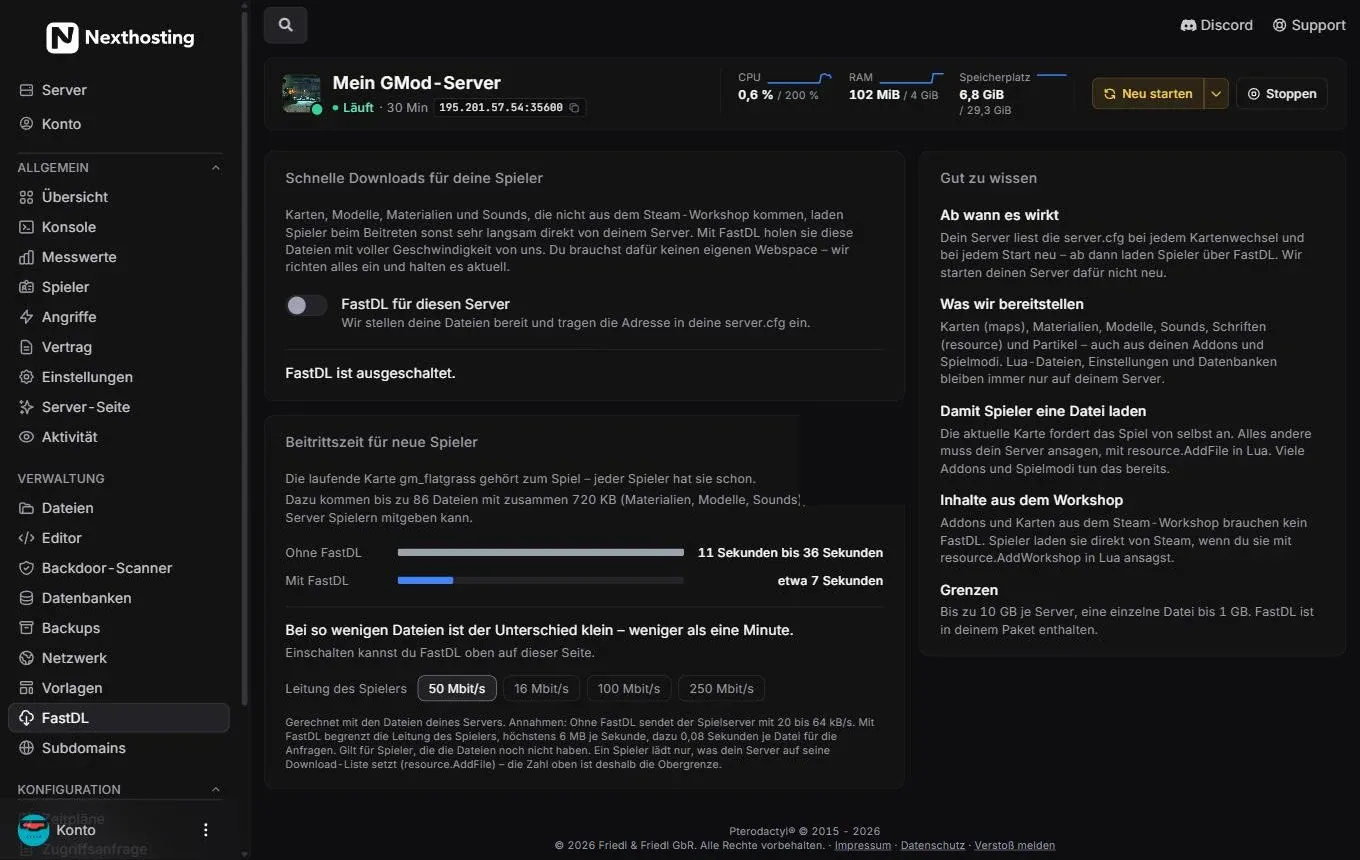
The FastDL page uses your server’s files to calculate how much faster joining becomes.
- Switch FastDL für diesen Server (FastDL for this server)
- Current state, here “FastDL ist ausgeschaltet.” (FastDL is switched off)
- Beitrittszeit für neue Spieler (join time for new players) – calculated from your server’s files
- Comparison Ohne FastDL (without FastDL) and Mit FastDL (with FastDL)
- Leitung des Spielers (player’s connection) – calculation for 16, 50, 100 or 250 Mbit/s
- Gut zu wissen (good to know)
- Grenzen (limits): up to 10 GB per server, a single file up to 1 GB
Switch on FastDL
Section titled “Switch on FastDL”- Open FastDL in the Verwaltung (management) group – or use the one-click setup “FastDL” on the Übersicht (overview).
- Switch on FastDL für diesen Server.
- Nexthosting makes your files available and enters the address into your
server.cfgautomatically. - From the next map change or restart, players download via FastDL. Your server is not restarted for this.
- File is on your server
- Syncnew and changed files regularly
- Server announces the fileresource.AddFile in Lua
- Player downloads fastfrom the FastDL address
What is made available
Section titled “What is made available”| Made available | Stays on your server only |
|---|---|
| Maps, materials, models, sounds, fonts (resource), particles – also from addons and game modes | Lua files, settings, databases |
So that players download a file
Section titled “So that players download a file”The game requests the current map by itself. Everything else your server has to announce, with resource.AddFile in Lua. Many addons and game modes already do this. An example:
-- garrysmod/lua/autorun/server/downloads.luaresource.AddFile("materials/meinserver/logo.png")resource.AddFile("sound/meinserver/willkommen.mp3")Workshop content does not need FastDL. Players download it directly from Steam if you announce it with resource.AddWorkshop:
resource.AddWorkshop("1234567890") -- ID of the Workshop addonSwitch off FastDL
Section titled “Switch off FastDL”If you switch FastDL off, Nexthosting removes the address from server.cfg again. The files remain retrievable for up to 48 hours, because a running server keeps announcing the address until the next map change. If the server is paused, locked or deleted, the provision ends immediately.
Design a loading screen
Section titled “Design a loading screen”With the GMod Loadingscreen Generator you design a loading screen that players see while joining – with rules, Discord address and real loading progress. No web space and no code needed, free for Nexthosting customers.
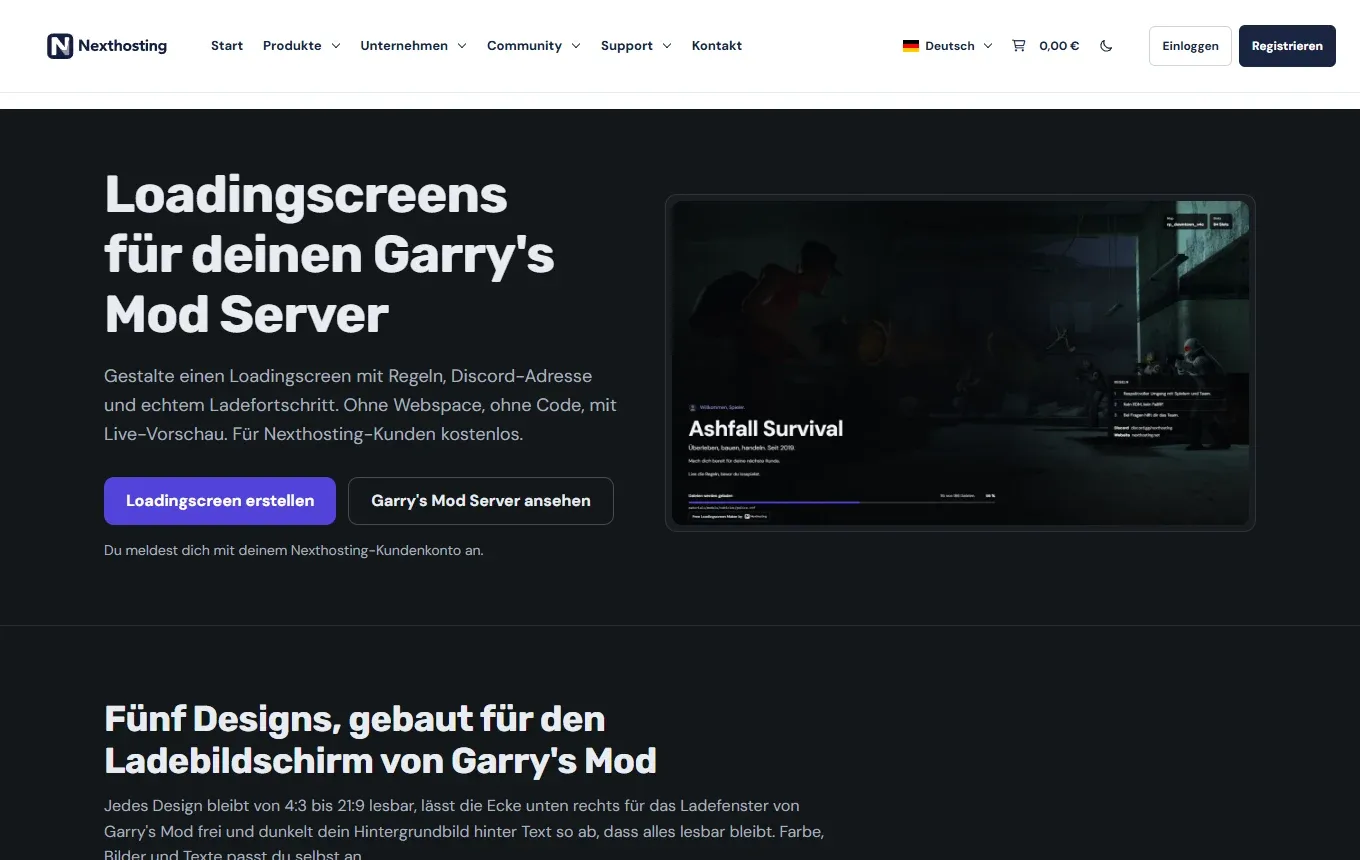
The generator on nexthosting.net. You log in with your customer account.
- Loadingscreen erstellen (“create loading screen”)
What the generator can do:
- five designs that stay readable from 4:3 to 21:9
- rules, tips, team and a greeting with the player’s Steam name
- Discord, TeamSpeak, website and Workshop as text
- background image or slideshow, logo, music (MP3 or OGG)
- real loading progress, German and English
- up to 10 loading screens per customer account, view statistics, pause, export and import
- Open nexthosting.net/gmod-loadingscreen-generator and click Loadingscreen erstellen – or in the panel on the Übersicht, click Gestalten (“design”) next to “Ladebildschirm”.
- Log in with your Nexthosting customer account.
- Choose a design and enter your content. The preview shows straight away how it looks.
- Publish the loading screen. The generator shows you a line with
sv_loadingurl. - Copy this line into
garrysmod/cfg/server.cfg– in the panel’s editor. - Restart the server.
This is roughly what the line looks like – always use exactly the line from the generator:
sv_loadingurl "https://…/your-loading-screen"Later changes in the generator go live immediately; you no longer have to touch server.cfg for them. The loading screen also works on servers that do not run at Nexthosting.
Frequently asked questions
Section titled “Frequently asked questions”Is FastDL worth it for my server?
Section titled “Is FastDL worth it for my server?”Look at the Beitrittszeit für neue Spieler calculation on the FastDL page. If you use almost only Workshop content, the difference is small. If you have many custom maps, models or sounds, new players save a lot of time.
Players download slowly despite FastDL.
Section titled “Players download slowly despite FastDL.”FastDL only takes effect from the next map change or restart. Files that your server does not announce with resource.AddFile are not downloaded by players at all. Single files over 1 GB and anything over 10 GB per server are not made available.
The loading screen does not appear.
Section titled “The loading screen does not appear.”Check that the sv_loadingurl line is in server.cfg exactly like that and that the server was restarted afterwards. If the line appears twice, the last one applies.