

02Account & billing
Order from Nexthosting – from plan to running server
How to order a game server, webspace or VPS from Nexthosting – configurator, contract or prepaid, add-ons, discount code, payment and provisioning.
In short
You choose a plan, set the billing type, payment interval and term in the configurator, add it to the cart and pay. As soon as the payment is confirmed, your product is set up automatically – a game server usually within a few minutes. With SEPA direct debit it takes much longer, because the bank has to confirm the debit first.
The shop is available in German and English, but the labels below are the German ones, as in the screenshots. The English meaning is given in parentheses.
How an order works
Section titled “How an order works”- Choose a plane.g. Minecraft Advanced
- ConfigureContract or prepaid, interval, term, add-ons
- Cart and loginCreate a customer account or log in
- PayChoose a payment method at checkout
- Payment confirmed?PayPal, card etc. usually instantly – SEPA direct debit about 12–13 days
- yes
- Automatic setupGame servers and VPS usually within a few minutes
- Open the productin the customer account under Deine Produkte
Step by step
Section titled “Step by step”-
Choose a plan. Pick your product in the shop, for example under Gameserver, Webspace or VPS Server, and click Paket wählen (“choose plan”) on the plan you want.
-
Configure. You land in the configurator (step “1 Produkt konfigurieren”, configure product). There, under Vertrag & Zahlung (contract and payment), you set how you want to pay – see Contract or prepaid? below.
-
Choose add-ons (optional). Everything in this section is voluntary. The free option is always preselected.
-
Enter a discount code (optional). Under the cart button, click “Du hast einen Rabattcode?” (“Do you have a discount code?”), enter the code and click Prüfen (“check”).
-
Add to cart. On the right you see what is due today. Click In den Warenkorb (“add to cart”) and complete the order in the cart (step “2 Warenkorb”). At the latest now you log in or create an account.
-
Pay. Choose a payment method at checkout. Which ones are offered depends on your order. An overview is in Paying.
-
Wait for setup. After the payment arrives, your product is set up automatically. The product appears in your customer account under Deine Produkte (your products). There you open it with Ansehen: for a game server with the Gameserver-Panel öffnen button, for web hosting with the Login button; for a VPS you find the IP address and root password in the Übersicht tab.
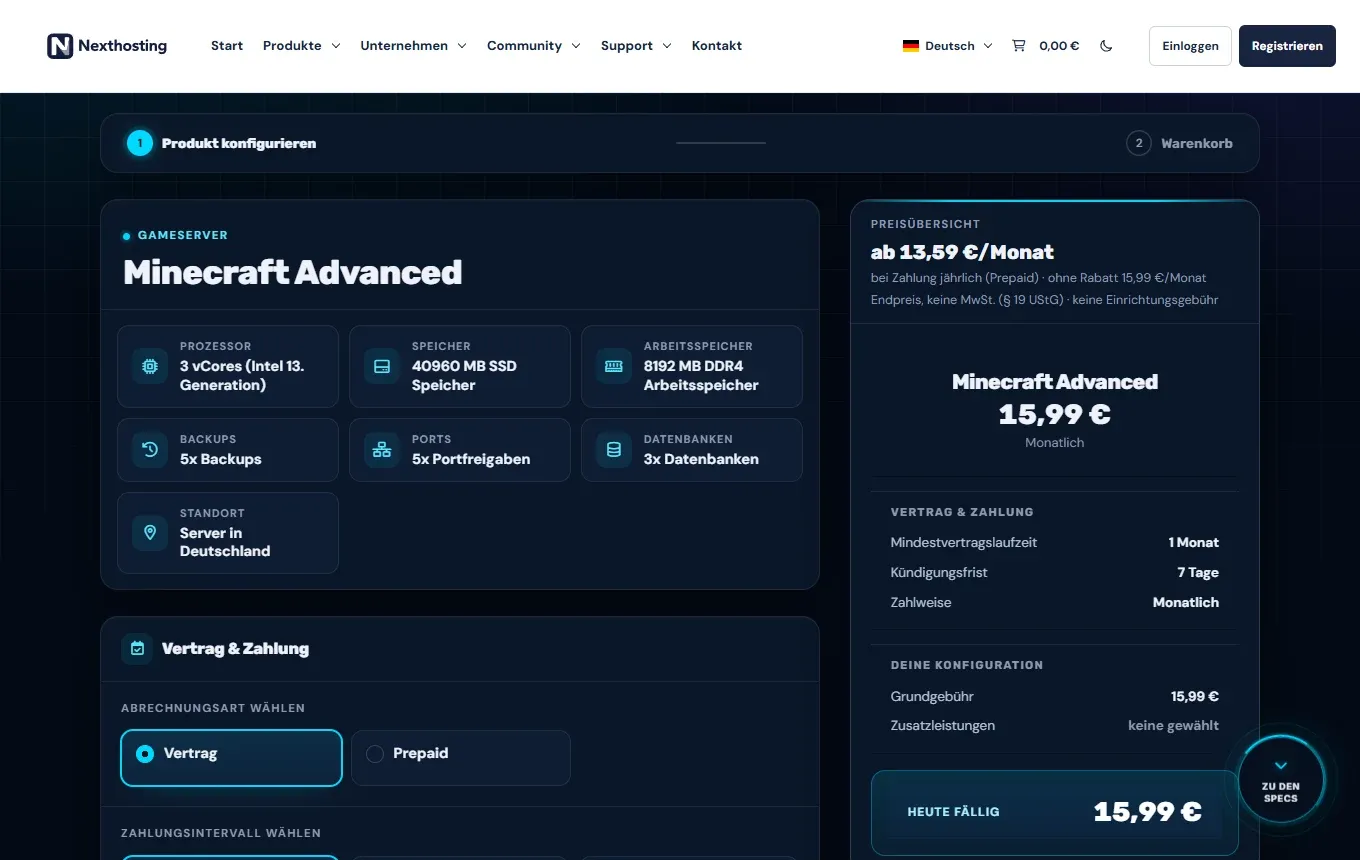
The configurator, using Minecraft Advanced as an example. Prices as of October 2026.
- Progress: “Produkt konfigurieren” (configure product), then “Warenkorb” (cart)
- Billing type: contract or prepaid
- Price summary with term, notice period and payment method
- “Heute fällig” (due today) – the amount you pay now
Contract or prepaid?
Section titled “Contract or prepaid?”Under Abrechnungsart wählen (choose billing type) you decide how your product is billed.
- Vertrag (contract): You choose a payment interval (for example monthly, every six months or yearly – longer intervals are cheaper) and a minimum contract term. For game servers the options are 1 month (notice period 7 days), 3 months (14 days), 6 months (1 month) and 1 year (1 month).
- Prepaid: You pay for a period in advance. After that the product ends unless you renew it. The longer the period, the cheaper the month – for game servers up to 15% off at 12 months (as of October 2026).
All the differences are in a table in Contracts and cancellation.
Add-ons
Section titled “Add-ons”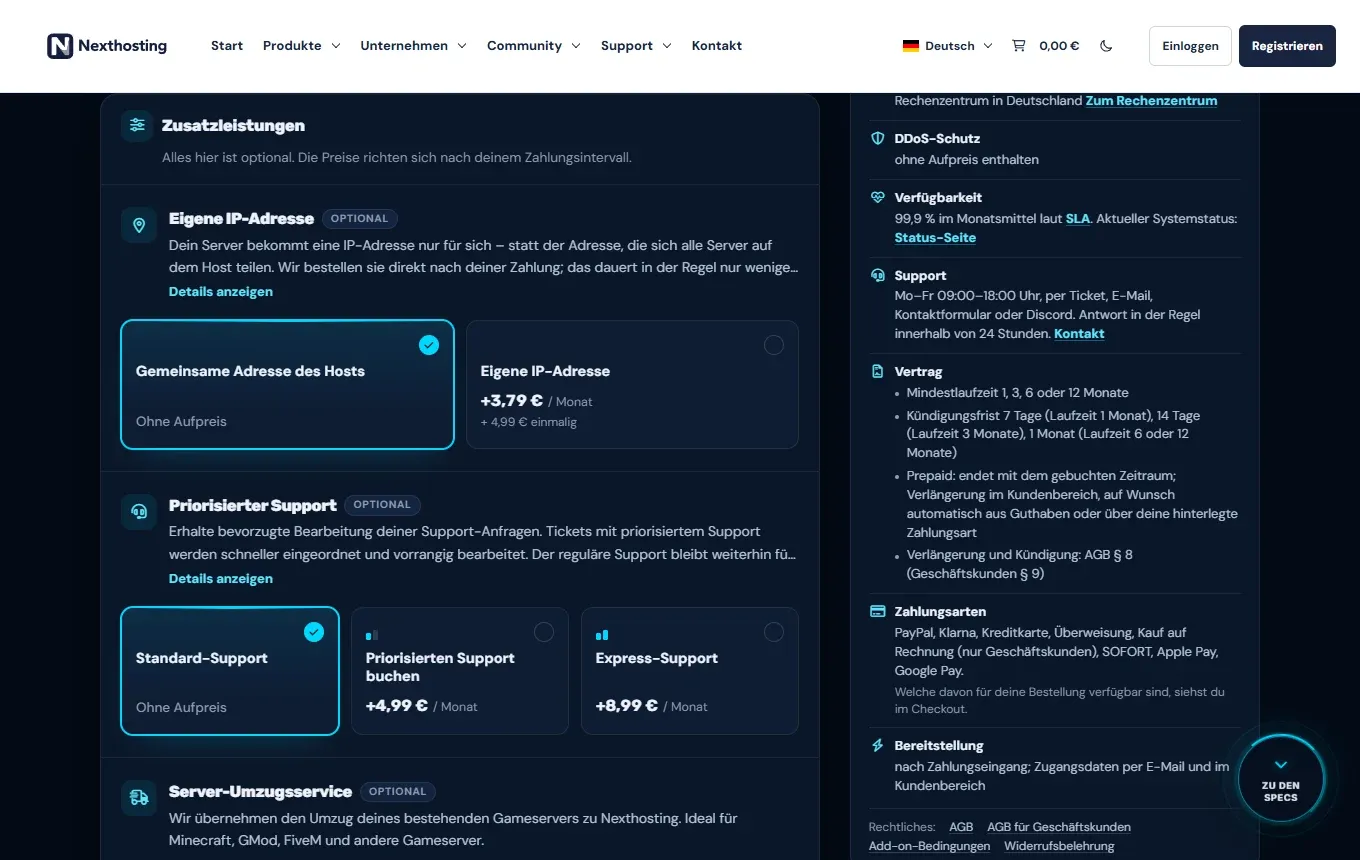
Add-ons are optional. On the right, the box “Das gilt für dieses Produkt” summarises contract, payment methods and provisioning.
- Own IP address
- Prioritised support or express support
- Contract terms of this product
For game servers you can add the following when you order (prices as of October 2026; current prices are in the configurator):
| Add-on | What you get | Price |
|---|---|---|
| Own IP address | An IPv4 address just for your server, plus the protection panel | €3.79 per month + €4.99 one-off |
| Prioritised support | Your tickets are sorted with priority – no guaranteed response time | €4.99 per month (express €8.99) |
| Server migration service | We move your existing server to Nexthosting | €0 (do it yourself), €9.99, €19.99 or €39.99 one-off |
| Managed game server | Technical care with a fixed monthly allowance | €9.99, €19.99 or €39.99 per month |
| Plugin/modpack installation | We install plugins, mods or a modpack | €4.99, €12.99 or €19.99 one-off |
These services are covered by the terms for add-ons and additional services (German). You can also book an own IP address later – see Own IP address.
For some games you also have to choose a variant, for example “Mit Mods” (“with mods”) for Valheim, “mit EXILED” for SCP: Secret Laboratory, or Vanilla, tShock or tModLoader for Terraria.
Discount codes
Section titled “Discount codes”Discount codes and price promotions only apply to the first payment, unless the promotion or the order process says otherwise. From the first renewal you pay the regular price (AGB § 7; AGB = General Terms and Conditions). A valid code is confirmed with “Der Code ist gültig und wurde angewandt” (“the code is valid and has been applied”).
After the order
Section titled “After the order”- Bestellungen (orders) in the customer account shows where your order stands.
- After the payment arrives, the system sets up your product automatically. Game servers and VPS are usually ready after a few minutes; dedicated servers can take longer, and so can domains, depending on the extension.
- You open your product in the customer account under Dienste → Deine Produkte → Ansehen. You open the game server from the account in the panel – instructions in Your first game server.
Nexthosting may also check orders, for example if abuse or false information is suspected, and reject them in those cases (AGB § 3 and § 5).
Frequently asked questions
Section titled “Frequently asked questions”Is there a setup fee?
Section titled “Is there a setup fee?”Not for game servers and VPS. For webspace and WordPress hosting, the Basic, Pro and Business plans cost a one-off €9.99 setup fee, the Starter plans nothing (as of October 2026). What counts is the order process.
Are the prices final prices?
Section titled “Are the prices final prices?”Yes. Nexthosting is a small business under § 19 UStG (German VAT Act) – nothing is added to the price, and invoices show no VAT.
Can I switch after ordering if the plan is too small?
Section titled “Can I switch after ordering if the plan is too small?”Yes. For game servers you can upgrade at any time, and you can also add RAM, storage or CPU individually. See Changing plans and upgrades.
Can I withdraw an order?
Section titled “Can I withdraw an order?”As a consumer you have a 14-day right of withdrawal (Widerrufsrecht). Because the server starts immediately at your request, you may have to pay compensation for the time used. Details in Right of withdrawal.