

10Help & support
Describe a problem well – get your ticket handled fast
A template for a good Nexthosting support ticket: what to include, how to attach console output and screenshots, and what never belongs in it.
In short
The more precisely you describe your problem, the faster support can help. State the product, the time, what you expected and what happened, and attach the error message. Never send passwords.
Why the description matters
Section titled “Why the description matters”Support cannot see your problem, only your text. A ticket saying “server not working” leads to follow-up questions, and every follow-up question costs a day. With the right details you often get a solution straight away.
The template
Section titled “The template”Copy this template into your ticket and fill it in:
Product: (for example game server "Mein Server", game Minecraft)Since when: (date and time it first happened)What I expected: (for example: players can join)What happens instead: (for example: error message "Connection timed out")Error message verbatim: (type it exactly or attach as an image)What I have already tried: (for example: restart, different browser)What changed last: (for example: installed a plugin, switched version)Who is affected: (only me, all players, only certain players)The more points you fill in, the less support has to ask.
What belongs in a good ticket
Section titled “What belongs in a good ticket”-
The affected product. If you open the ticket in the customer account, you select the product and it is assigned. If you write by email, state your customer number, product and server name.
-
The time. When did it last work, when did it first not work? This helps support find the right spot in the logs.
-
The exact wording of the error message. Type the message exactly or take a screenshot. “An error appears” is not enough; “Error 502 Bad Gateway” is.
-
The steps that lead to the error. Describe what you clicked or entered so that support can reproduce it.
-
What you have already tried. That way support does not have to suggest the same thing again.
-
The console output, if it is about a game server. How to copy it is in the next section.
-
Screenshots, if something looks wrong or you cannot copy a message.
Attach console output
Section titled “Attach console output”With game server problems, the cause is often in the console.
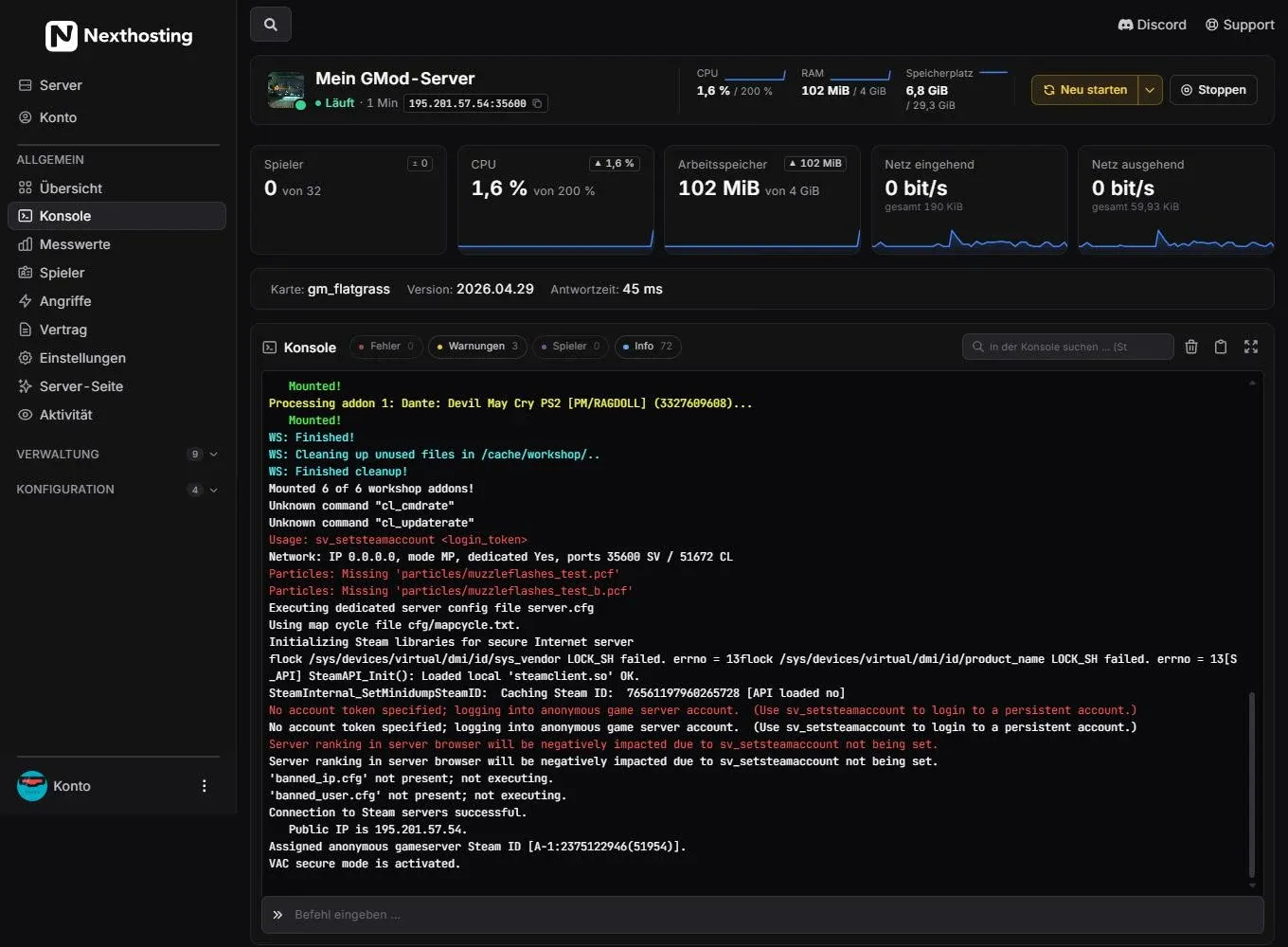
The console in the panel shows what your server outputs.
- Filters for errors, warnings, players and info
- Buttons for clearing, copying and full-screen mode
- Input line for commands
How to proceed:
- Open the Konsole (console) in the panel.
- Filter by Fehler (errors) if you only want to see the error lines, or leave everything visible.
- Copy the lines around the error with the copy button. Better too much than too little, ideally the lines since the last start.
- Paste them into the ticket, not as a photo of the screen.
If you create the ticket with Problem melden (report a problem) directly in the panel, the diagnosis is attached automatically. You can deselect attaching the last console lines. See Report a problem.
Screenshots that help
Section titled “Screenshots that help”- Take a screenshot of the whole window including the address bar, so that it is clear where you are.
- Show the error message in full, not just a section.
- Cover personal data and secrets before you upload the image.
- Several images are better than one if a process has several steps.
Example: bad and good
Section titled “Example: bad and good”Bad:
My server is not working. Please help!
Good:
Product: Minecraft server “Survival” (Advanced) Since yesterday around 8:30 pm, players can no longer get onto the server. The game reports “Connection timed out”. In the panel the server shows “Läuft” (running). I restarted it, without success. Yesterday afternoon I installed the plugin “Beispiel”. From 8:28 pm the console shows these lines: (pasted). All players are affected.
The second ticket can be handled immediately.
Frequently asked questions
Section titled “Frequently asked questions”Should I put several problems in one ticket?
Section titled “Should I put several problems in one ticket?”Better one ticket per problem. That way each can be tracked and closed individually.
Should I write to support again if there is no answer after a day?
Section titled “Should I write to support again if there is no answer after a day?”The first reply usually comes within 24 hours on working days. Reply in the existing ticket instead of opening a new one, so that the history stays together. See Support.
May I give support access to my server?
Section titled “May I give support access to my server?”Raise it in the ticket and ask how to do it securely. Do not put passwords in a public message.