

03Game server panel
Game server console – start, stop and send commands
How to use the console in the Nexthosting game server panel – start, restart and stop your server, send commands, and filter and search the output.
In short
With the buttons at the top right you start, restart or stop your server. In the Konsole (console) you see live what the server outputs and send it commands via the “Befehl eingeben …” (“enter command …”) field. Filters and search help you find errors quickly.
The console at a glance
Section titled “The console at a glance”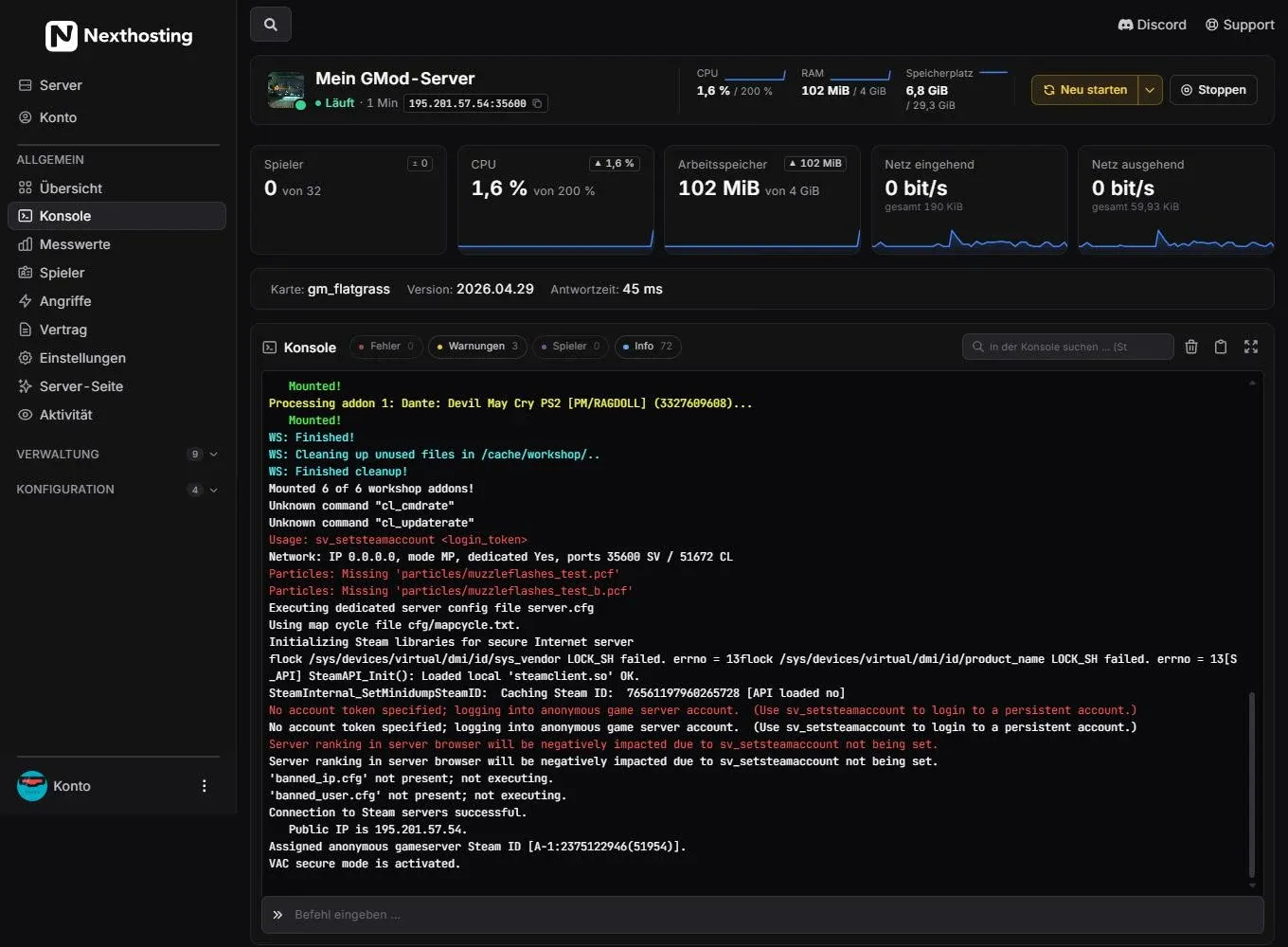
The console shows everything your server outputs. Red lines are errors, yellow ones are warnings.
- Neu starten (“restart”)
- Arrow next to it: Neustart planen (schedule a restart)
- Stoppen (“stop”)
- Tiles: players, CPU, RAM, network in and out
- Row with map, version and response time
- Filters Fehler (errors), Warnungen (warnings), Spieler (players), Info – with counts
- Search field “In der Konsole suchen …” (“search the console …”)
- Buttons to clear, copy and go full screen
- Input field “Befehl eingeben …” (“enter command …”)
Start, restart, stop
Section titled “Start, restart, stop”| Button | What happens | When to use it |
|---|---|---|
| Starten (“start”) | The server boots up. Only appears when it is stopped. | After stopping or after a reinstall |
| Neu starten (“restart”) | The server is shut down cleanly and started again right away. | After changes to files, addons or startup variables |
| Stoppen (“stop”) | The server is shut down and stays off. | Before templates like DarkRP, before uploading large worlds |
- Restart
- Server saves and shuts downPlayers are disconnected
- StartThe console shows the loading process
- Status "Läuft" (running)Players can connect
Schedule a restart
Section titled “Schedule a restart”The small arrow next to Neu starten opens Neustart planen (schedule a restart). With it you set up a restart for a specific time. The panel sends your players two warnings in chat beforehand and then restarts the server. In the background a schedule is created for this, which you will find again under Konfiguration → Zeitpläne (schedules). This feature exists for games where Nexthosting has enabled it. More on this under Schedules and restarts.
Send commands
Section titled “Send commands”- Open Konsole (console) in the sidebar.
- Click into the Befehl eingeben … (“enter command …”) field at the very bottom.
- Type the command – without a slash at the start – and press Enter.
- The server’s answer appears in the console.
Which commands exist depends on the game. A few examples:
status show players with Steam IDchangelevel gm_construct change mapsay Restart in 5 minutes message to everyonelist who is online?say Restart in 5 minutes message to everyoneop PlayerName grant admin rightsstatus show playerssay "Restart in 5 minutes" message to everyoneserver.save save the worldGame-specific commands are in the game guides.
Filter and search the output
Section titled “Filter and search the output”A console quickly fills up with hundreds of lines. The filters above the output show how many lines there are of each kind:
- Fehler (errors) – red lines, for example missing files or crashed addons
- Warnungen (warnings) – yellow lines, often harmless but a good hint
- Spieler (players) – joins, leaves, chat
- Info – everything else
Click a filter to see only those lines. In the In der Konsole suchen … (“search the console …”) field you find individual words, such as the name of an addon. To the right of it you clear the display, copy the content to the clipboard or switch to full screen.
Frequently asked questions
Section titled “Frequently asked questions”The console stays empty. What can I do?
Section titled “The console stays empty. What can I do?”Check at the top whether the server is running. A stopped server outputs nothing. If it is running, reload the page. If it stays empty, there may be an outage – check the status page.
Why are there red lines in the console although everything works?
Section titled “Why are there red lines in the console although everything works?”Many games write warnings and errors that do not disturb operation, such as missing particle files in Garry’s Mod. What matters are errors that appear right before a crash or that keep repeating.
How do I find out that my server has crashed?
Section titled “How do I find out that my server has crashed?”Have yourself notified when it ends unexpectedly: by email or Discord. You set this up under Einstellungen (settings) – see Metrics and notifications.