

10Help & support
Read the Nexthosting status page and maintenance notices
How to read the Nexthosting status page, learn about planned maintenance and check, during an outage, whether the problem is on your side or at Nexthosting.
In short
At status.nexthosting.net/status/nh you can see without logging in whether Nexthosting services are running, and read notices about maintenance and outages. Nexthosting usually announces planned maintenance at least 48 hours in advance.
The status page
Section titled “The status page”The status page is available at status.nexthosting.net/status/nh. It shows the state of the infrastructure, including game servers, VPS, network and other services. Maintenance, impairments and outage notices are announced openly there. You do not need an account.
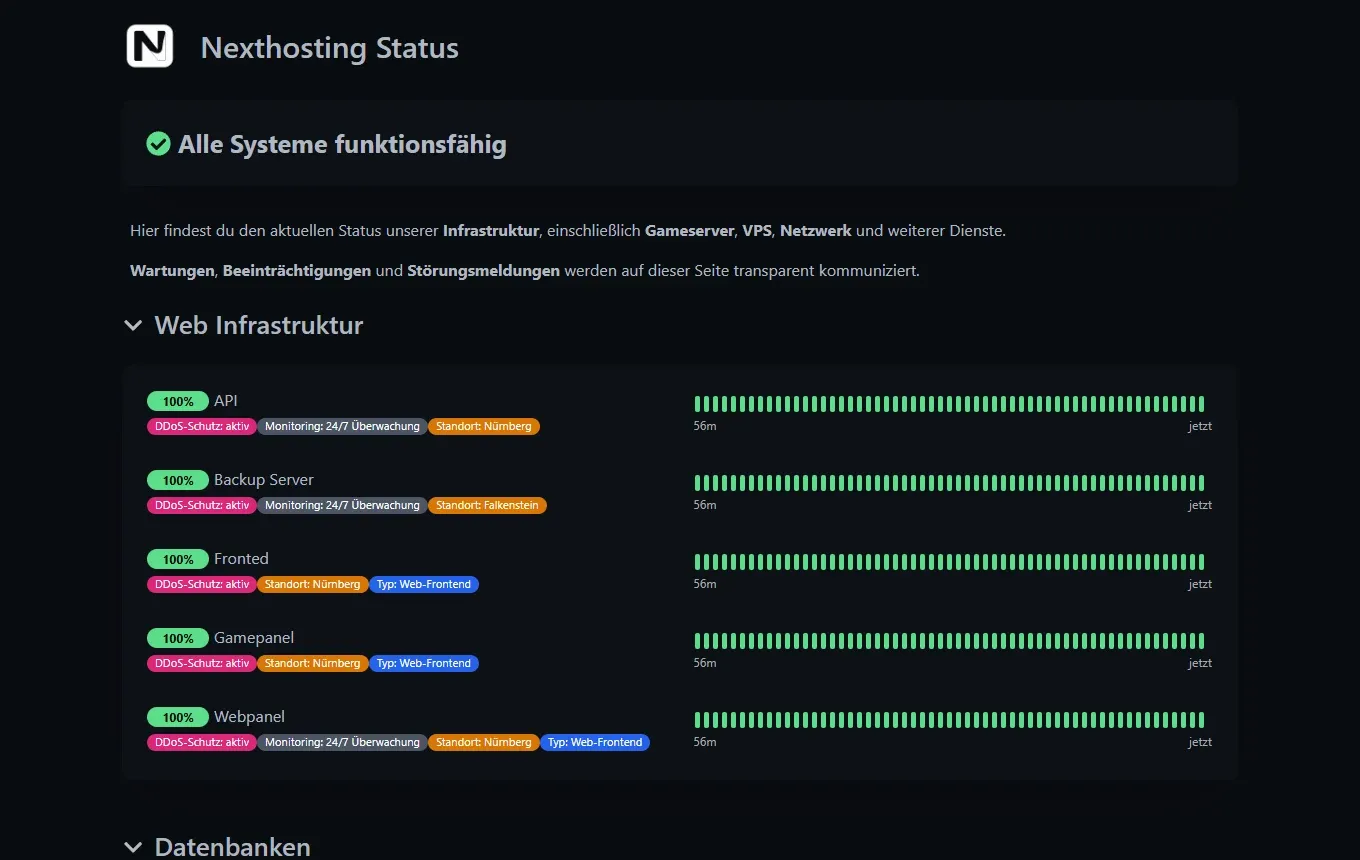
The status page during normal operation.
- Overall message, for example “Alle Systeme funktionsfähig” (all systems operational)
- Notice about maintenance, impairments and outage notices
- A service with a percentage and a bar: each stripe stands for a period of time, green means reachable
How to read the page
Section titled “How to read the page”- The overall message at the very top summarizes the state.
- Services are sorted into groups, for example “Web Infrastruktur” (web infrastructure) with service cards such as Gamepanel and Webpanel.
- The bar next to each service shows the history. If it is solid green, the service ran without interruption during the period shown.
- If a service is not green, there is a message above or below it explaining what is going on.
Panels, databases and other services also have entries of their own. If your problem concerns one of these services and it is not green, it is very likely not on your side.
Planned maintenance
Section titled “Planned maintenance”Nexthosting occasionally performs maintenance, for example for new hardware or updates. A service may be briefly unavailable during that time.
- At least 48 hours beforeAnnouncementvia the status page, by email or in the customer area
- During the maintenanceNotice on the status pagea notice appears in the game server panel
- AfterwardsService is running again
The announcement usually comes at least 48 hours in advance via the status page, by email or in the customer area. For game servers, the maintenance also appears as a notice at the top of the panel, in the dashboard and on the server pages.
By the way, maintenance does not count as an outage under the SLA. More: SLA and availability.
Is it me or Nexthosting?
Section titled “Is it me or Nexthosting?”What to do during an outage
Section titled “What to do during an outage”- Check the status page. If there is a notice, wait. You do not need to write a ticket; the problem is known.
- Check your own connection. Open another website. If that does not load either, the problem is with your internet connection.
- Check the address. Are IP address and port correct? Do you use a subdomain? Is the game version right?
- Look at the console of your game server in the panel. Is the server running, and are there errors? See Console and controls.
- Restart the server if it hangs. See Server overview.
- Write a ticket if the status page is green and the problem remains. Describe it the way Describe a problem well shows.
Outages and credit
Section titled “Outages and credit”For game servers, VPS, Webspace, WordPress, dedicated servers and Discord bot hosting, Nexthosting states an availability of 99.9% on a monthly average. If it falls below that, you can receive a credit on request. To do so, write a ticket within 30 days after the end of the month. The credit goes to your Guthaben (account credit). The details and exceptions are in the SLA and under SLA and availability. The text of the SLA is binding.
Frequently asked questions
Section titled “Frequently asked questions”Where do I learn about maintenance?
Section titled “Where do I learn about maintenance?”On the status page, by email or in the customer area. For game servers, additionally as a notice in the panel.
Do I have to write a ticket during an outage?
Section titled “Do I have to write a ticket during an outage?”No, if the outage is on the status page. The problem is known there. Write a ticket if the status page is green and your problem remains.
The status page shows green, but my server is not reachable.
Section titled “The status page shows green, but my server is not reachable.”Then it is usually the server itself or your connection. Check the console and the address. See the steps above.
Can I be notified about outages?
Section titled “Can I be notified about outages?”For your game server, you can turn on notifications for crashes and high load by email or Discord. See Metrics and notifications.