

03Game server panel
Game server templates, mods and modpacks
Set up DarkRP, TTT or ULX with one click, install Minecraft modpacks and Rust frameworks, and upload your own mods – here is how it works at Nexthosting.
In short
Under Vorlagen (templates) you set up your server for a game mode or a framework with one click – for Garry’s Mod, for example, DarkRP, TTT, Sandbox or ULX. Before you start you see exactly what will be replaced, and the panel offers you a backup. You upload your own mods and addons via the file manager or SFTP.
The “Vorlagen” page
Section titled “The “Vorlagen” page”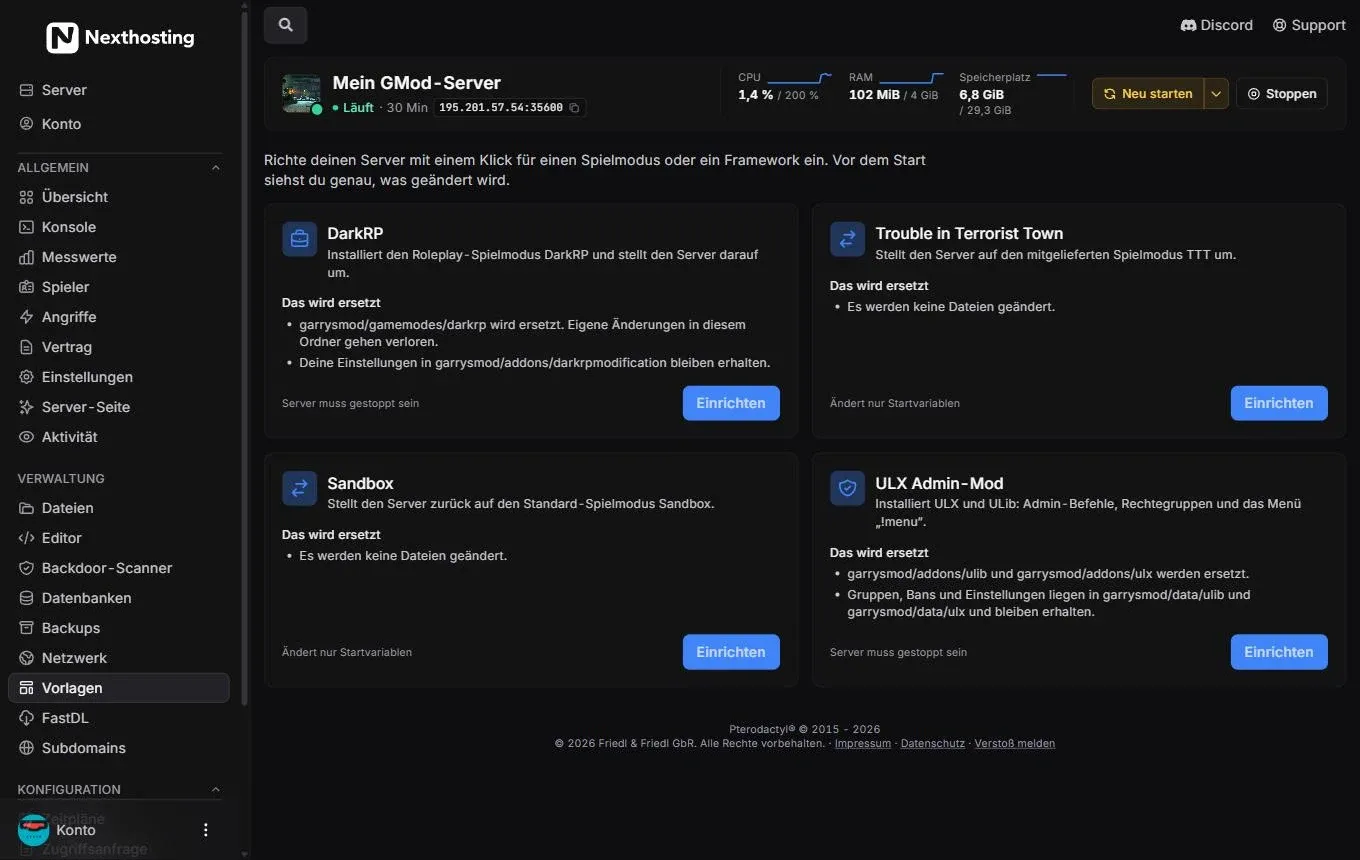
Templates of a Garry’s Mod server. Each card says exactly what it changes.
- Short explanation: “Vor dem Start siehst du genau, was geändert wird.” (Before you start you see exactly what will be changed.)
- Name and description of the template
- Das wird ersetzt (this will be replaced) – which folders are overwritten and what is kept
- Requirement, e.g. “Server muss gestoppt sein” (the server must be stopped) or “Ändert nur Startvariablen” (only changes startup variables)
- Einrichten (“set up”)
- Another template, here ULX Admin-Mod
The templates for Garry’s Mod
Section titled “The templates for Garry’s Mod”| Template | What it does | What is replaced | Requirement |
|---|---|---|---|
| DarkRP | installs the roleplay game mode and switches the server to it | garrysmod/gamemodes/darkrp (your own changes there are lost); garrysmod/addons/darkrpmodification is kept |
server must be stopped |
| Trouble in Terrorist Town | switches to the bundled TTT game mode | no files | only changes startup variables |
| Sandbox | switches back to the default game mode | no files | only changes startup variables |
| ULX Admin-Mod | installs ULX and ULib: admin commands, permission groups, menu !menu |
garrysmod/addons/ulib and garrysmod/addons/ulx; groups, bans and settings in garrysmod/data/ulib and garrysmod/data/ulx are kept |
server must be stopped |
How to set up a template
Section titled “How to set up a template”- Choose a templateRead "Das wird ersetzt"
- Stop the serverif required
- Backup?The panel asks
- Set upFiles and startup variables
- Start the server
- Open Vorlagen in the sidebar – or use the Ein-Klick-Einrichtung (one-click setup) on the Übersicht (overview).
- For the template you want, read the Das wird ersetzt section.
- If it says “Server muss gestoppt sein”, click Stoppen (“stop”) at the top.
- Click Einrichten.
- If the backup question is switched on, the panel asks whether a backup should be created first. Say yes if your plan has backup slots.
- Wait until the setup has finished and start the server.
Switch on the backup question
Section titled “Switch on the backup question”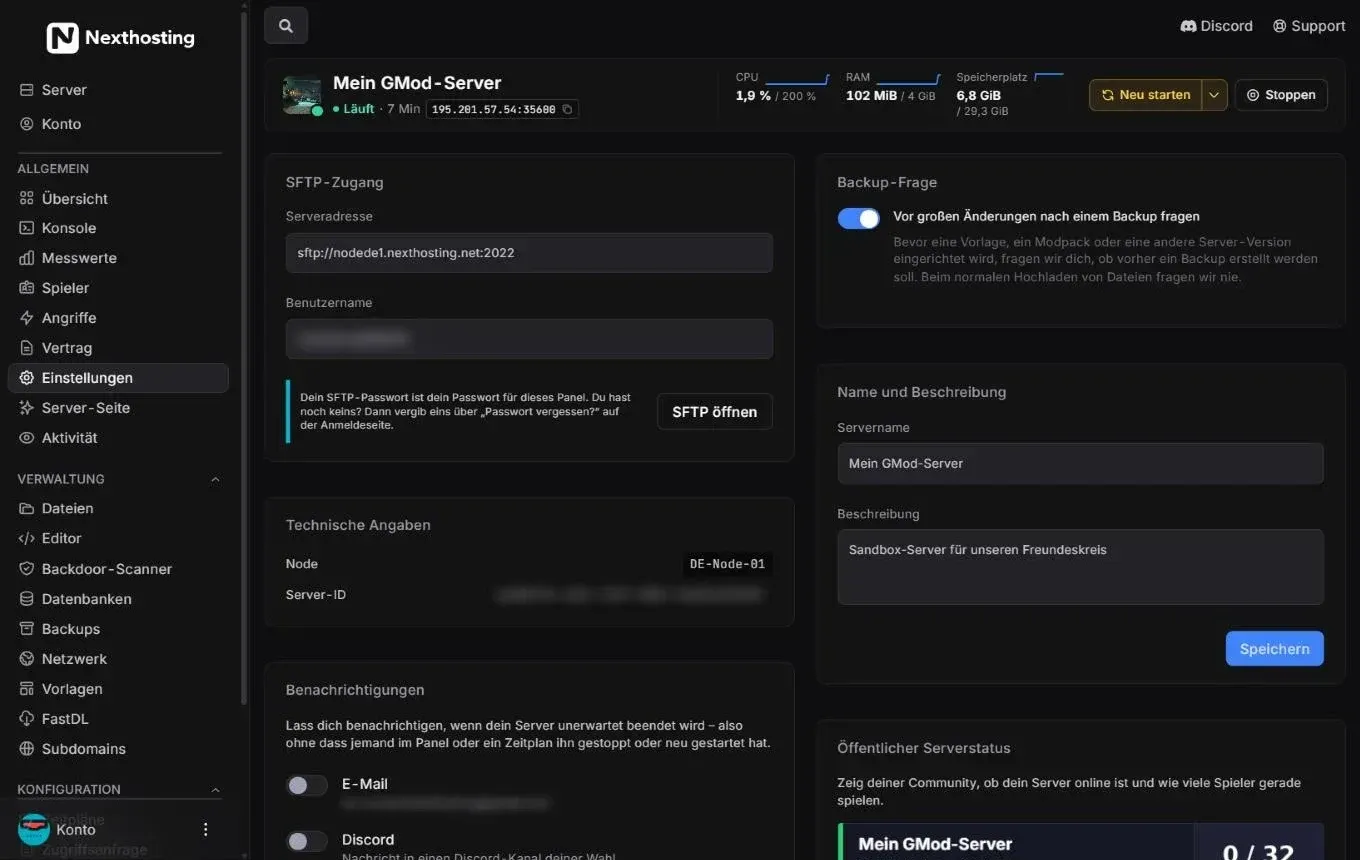
The switch is under Einstellungen (settings) in the Backup-Frage (backup question) box.
- Vor großen Änderungen nach einem Backup fragen (ask about a backup before big changes)
When the switch is on, the panel asks about a backup before every template, every modpack and every change of server version. It never asks when you simply upload files.
Templates and extensions in other games
Section titled “Templates and extensions in other games”What the panel offers depends on the game:
| Game | What is available |
|---|---|
| Minecraft | Modpacks & Mods (from Modrinth), plugin installer, Versions-Wechsler (version switcher), Properties-Editor for server.properties, Bedrock-Crossplay (Geyser and Floodgate at the click of a button on Paper, Purpur or Fabric) |
| Rust | Templates for Carbon or Oxide (uMod); plugins as a .cs file in carbon/plugins or oxide/plugins |
| Valheim | “Mit Mods (BepInEx vorinstalliert)” (with mods, BepInEx preinstalled) when ordering; mods as .dll in BepInEx/plugins |
| ARK | Workshop IDs separated by commas in the startup variables; the order is the load order |
| Arma 3 and DayZ | mod list from the launcher as modlist.html in the main directory |
| SCP: Secret Laboratory | selectable “mit EXILED” (with EXILED) when ordering |
| Terraria | Vanilla, tShock or tModLoader when ordering |
The details are in the guides for Minecraft, Rust, Garry’s Mod and the other games.
Upload your own mods and addons
Section titled “Upload your own mods and addons”For everything that has no template, you upload the files yourself:
- Stop the server.
- Upload the mod or addon to the right folder – for example
garrysmod/addonsfor Garry’s Mod orpluginsfor a Minecraft Paper server. Small files work in the file manager, large ones via SFTP. - For Garry’s Mod, check new addons with the backdoor scanner.
- Start the server and check the console for errors.
Garry’s Mod downloads Steam Workshop addons via the Workshop collection in the startup variables.
Frequently asked questions
Section titled “Frequently asked questions”Can I undo a template?
Section titled “Can I undo a template?”Only via a backup you created beforehand. Game modes that only change startup variables (TTT, Sandbox) you simply switch back with the other template.
My DarkRP jobs are gone after the template.
Section titled “My DarkRP jobs are gone after the template.”If you worked directly in gamemodes/darkrp, those changes were replaced. Restore them from the backup and move them into addons/darkrpmodification.
Why won’t the server start after adding a mod?
Section titled “Why won’t the server start after adding a mod?”Usually the mod does not match the game version or a required second mod is missing. The console names the error. Remove the mod you added last and try again.