

02Account & billing
Manage and cancel contracts at Nexthosting
Contract or prepaid, terms and notice periods at Nexthosting – how to cancel in your customer account or without logging in, and what happens to your data.
In short
You cancel a contract in the customer account with the Kündigen (“cancel”) button at the contract – no email, no ticket, and you get the confirmation immediately. Without logging in, use nexthosting.net/kuendigung. A monthly plan can be cancelled up to 7 days before its renewal day; the customer account shows the dates. You do not have to cancel prepaid products; they end by themselves.
The shop is available in German and English, but the labels below are the German ones, as in the screenshots. The English meaning is given in parentheses.
Contract and prepaid compared
Section titled “Contract and prepaid compared”When you order, you choose the billing type (Abrechnungsart). The differences:
| Vertrag (contract) | Prepaid | |
|---|---|---|
| Payment | Invoice for each billing period, due in advance | the whole booked period paid in advance |
| Renewal | automatic until you cancel | none – the product ends with the period, unless you renew it yourself or switch on automatic renewal |
| Cancellation | necessary, with a notice period | not necessary |
| Term | Minimum contract term, for game servers 1, 3, 6 or 12 months | the booked period |
| Open invoice | Reminder, suspension from day 2 at the earliest, contract end from day 10 at the earliest | no payment reminder process: suspension after expiry, deletion after the suspension period |
| Pausing a game server | possible on a monthly contract (with a stored card or SEPA mandate, or at least €10 credit) | not possible |
| Price advantage | longer payment intervals are cheaper | the further ahead you pay, the cheaper – for game servers up to 15% off at 12 months |
As of October 2026. The configurator of each product shows the exact details.
Terms and notice periods
Section titled “Terms and notice periods”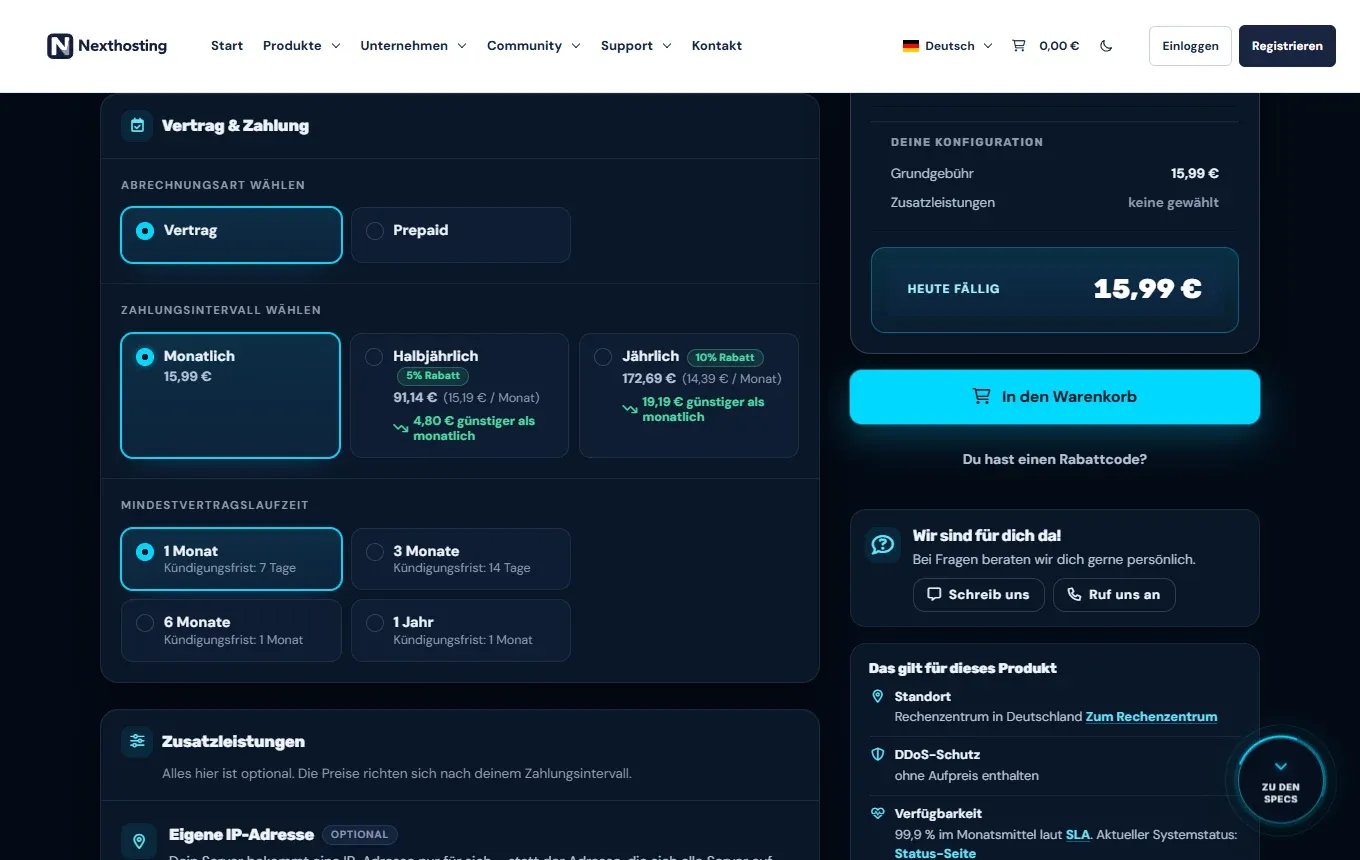
You choose the term and notice period when you order, in the section “Vertrag & Zahlung”.
- Billing type: contract or prepaid
- Payment interval
- Minimum contract term with the respective notice period
| Product | Term | Notice period |
|---|---|---|
| Game server, 1-month contract | 1 month, renews by 1 month each time | up to 7 days before the renewal day |
| Game server, 3-month contract | 3 months | 14 days |
| Game server, 6-month contract | 6 months | 1 month |
| Game server, 1-year contract | 12 months | 1 month |
| VPS | monthly | up to 7 days before the renewal day |
| Webspace and WordPress hosting, 1-month contract | 1 month | 7 days |
| Webspace and WordPress hosting, 6 or 12-month contract | 6 or 12 months | 1 month |
| Prepaid (all products) | booked period | no cancellation needed |
For private customers the following also applies: if a contract renews after a longer first term, it only renews for an indefinite period, and after that it can be cancelled at any time with one month’s notice. An initial commitment lasts at most 24 months (AGB § 8; AGB = General Terms and Conditions). More background in Cancellation and terms.
Cancelling in the customer account
Section titled “Cancelling in the customer account”- Log in to your customer account and open Deine Verträge (your contracts).
- Choose the contract you want to end.
- Click the cancel button. On a monthly plan it reads “Zum 29.10.2026 kündigen” (cancel as of 29.10.2026; the date is your renewal day). You can give a reason, but you do not have to.
- Confirm the cancellation. You get the confirmation immediately.
On a monthly plan, cancel at least 7 days before the renewal day. The renewal day is the day your contract would renew, not the end of the calendar month. For your contract the account shows, for example, “Kündigung 7 Tage Frist · frühestens zum 29.10.2026” (cancellation, 7 days’ notice, earliest as of 29.10.2026). Until then the product keeps running normally. For some older contracts a different notice period may be stored, for example 14 days; what counts is the entry on your contract in the customer account.
Cancelling without logging in
Section titled “Cancelling without logging in”If you cannot get into your account, use the link Verträge hier kündigen (“cancel contracts here”) in the footer of every page on nexthosting.net. It leads to nexthosting.net/kuendigung.
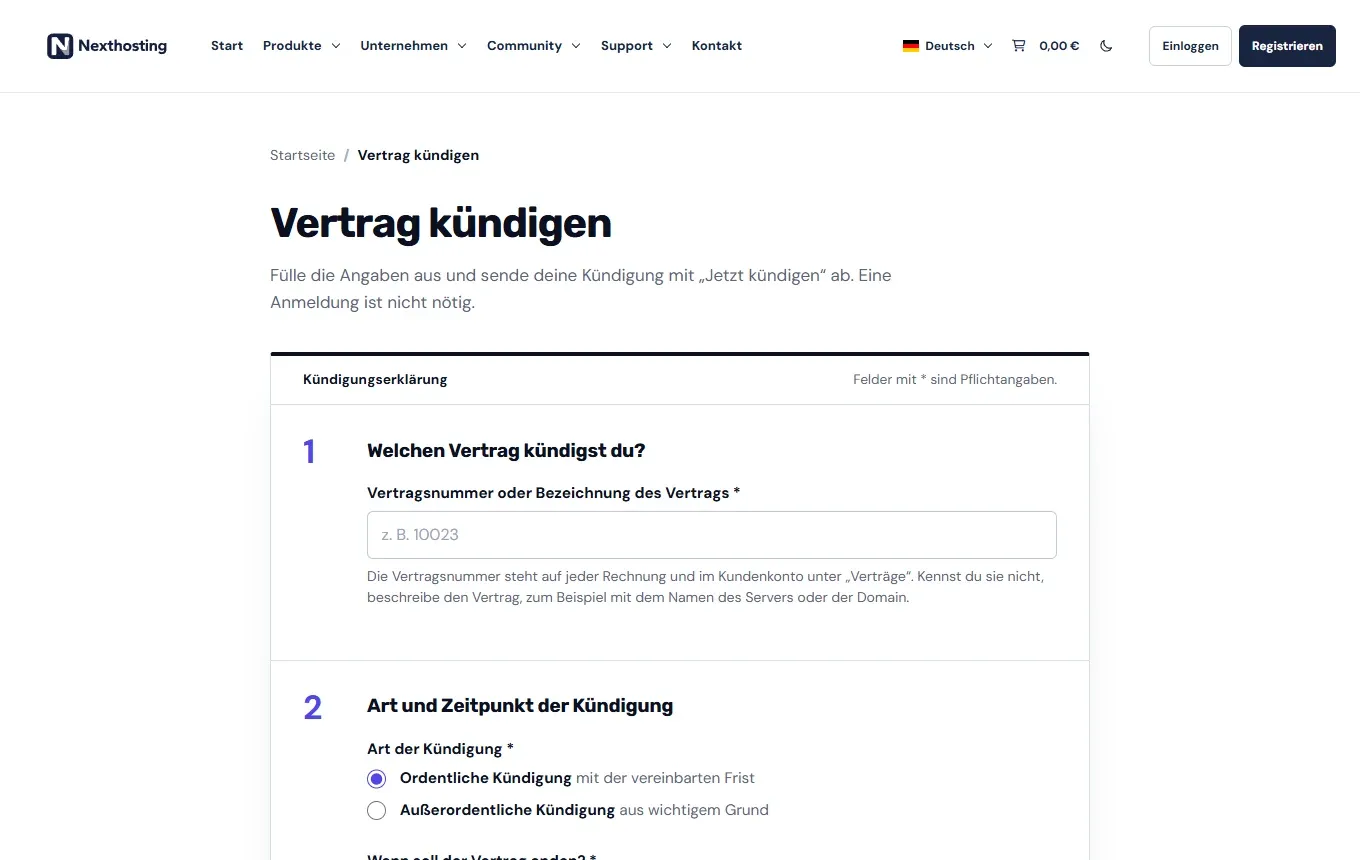
The cancellation page works without logging in.
- Contract number or description of the contract
- Ordinary cancellation with the agreed notice period, or extraordinary cancellation for good cause
- Which contract are you cancelling? Enter the contract number (Vertragsnummer). It is on every invoice and in the customer account under Deine Verträge (your contracts). If you do not know it, describe the contract, for example with the name of the server or the domain.
- Type and time: Choose “Ordentliche Kündigung mit der vereinbarten Frist” (ordinary cancellation with the agreed notice period) or “Außerordentliche Kündigung aus wichtigem Grund” (extraordinary cancellation for good cause; then give a short reason). Then choose “Zum nächstmöglichen Zeitpunkt” (at the earliest possible date) or “Zu einem bestimmten Datum” (on a specific date).
- Your details: First name, last name, email address and, optionally, your customer number. Ideally use the email address of your customer account – then the cancellation can be matched directly to your contract.
- Click Jetzt kündigen (“cancel now”). The confirmation goes to your email address straight away. You can save or print the receipt page with your declaration; it can be retrieved for 30 days.
A cancellation in text form, for example by email to support@nexthosting.net, is also effective (AGB § 8). Include the contract number.
What happens after the contract ends
Section titled “What happens after the contract ends”- Game servers: The right to use the server ends with the contract, and the server can be suspended immediately. If it is not renewed or reactivated within 48 hours, Nexthosting may permanently delete it together with its data, configurations and backups (AGB § 8).
- All other products with a contract (for example VPS, dedicated server, web hosting): the product is removed on the day the contract ends; there is no period like the one for game servers. Back up beforehand.
- Prepaid: the product is suspended at expiry and deleted a few days later, depending on the booked period.
- Add-ons such as own IP address, expansions or Managed run with the contract and end with it.
- Domains: If you cancel a contract that includes a domain without arranging a transfer to another provider, Nexthosting may let the domain expire after advance notice (AGB § 11). If you want to keep the domain, take care of the transfer beforehand.
- Open invoices for services already provided remain due even after cancellation.
Cancellation or withdrawal?
Section titled “Cancellation or withdrawal?”A Kündigung (cancellation) ends a contract for the future. A Widerruf (withdrawal) reverses a contract you have just concluded within 14 days – this only exists for consumers. You declare a withdrawal at nexthosting.net/vertrag-widerrufen. Details in Right of withdrawal.
Frequently asked questions
Section titled “Frequently asked questions”Do I get money back if I cancel before the end of the period?
Section titled “Do I get money back if I cancel before the end of the period?”An ordinary cancellation takes effect at the end of the term. Until then the period is paid and you can keep using your product. A pro-rata refund is not provided for.
I cancelled by mistake. What now?
Section titled “I cancelled by mistake. What now?”Contact us by ticket as quickly as possible and name the contract so support can look into it.
Can I cancel a paused server?
Section titled “Can I cancel a paused server?”Yes. But when the contract ends, the stored data is deleted as well. If you still need it, resume the server first and back up the data.
Where do I find my contract number?
Section titled “Where do I find my contract number?”On every invoice and in the customer account under Deine Verträge.