

08Cloud Storage
Cloud Storage: billing, traffic and limits
What Nexthosting Cloud Storage costs, how traffic and extra traffic are billed on your bill, what Flex means, and which limits and locks apply (storage full).
In short
You pay for Cloud Storage monthly. Plans cost from €1.99 (100 GB) to €99.99 (10 TB) and can be cancelled monthly (as of November 2026). Download traffic is included up to the size of your storage. When it is used up, nothing extra is charged: downloads continue at 50 Mbit/s, or you book extra traffic. If you want to pay by usage, apply for Flex.
All prices are final prices; Nexthosting is a small business under § 19 UStG (German VAT Act). Current prices are always on the shop page Cloud Storage.
| Storage | Traffic included | Price per month (as of November 2026) |
|---|---|---|
| 100 GB | 100 GB | €1.99 |
| 250 GB | 250 GB | €3.99 |
| 500 GB | 500 GB | €5.99 |
| 1 TB | 1 TB | €9.99 |
| 2 TB | 2 TB | €19.99 |
| 5 TB | 5 TB | €49.99 |
| 10 TB | 10 TB | €99.99 |
From 1 TB upward, that is 1 cent per gigabyte per month. On top of that comes bonus storage: 10 GB for each active game server, Webspace or VPS contract, up to 50 GB. How you pay and what credit and automatic renewal mean is explained in Paying and Credit and automatic renewal.
Traffic
Section titled “Traffic”Download traffic is everything transferred out of the storage: downloads in the browser, via share links, via SFTP, WebDAV or S3. Uploading does not count. The included traffic applies per contract month and is as large as your plan, bonus storage included.
You can see usage on the Overview (Übersicht) and under Usage (Nutzung) (storage and traffic per day, with “Values as table” (Werte als Tabelle)). The values update hourly. After your first upload or download it takes about an hour until the first values appear.
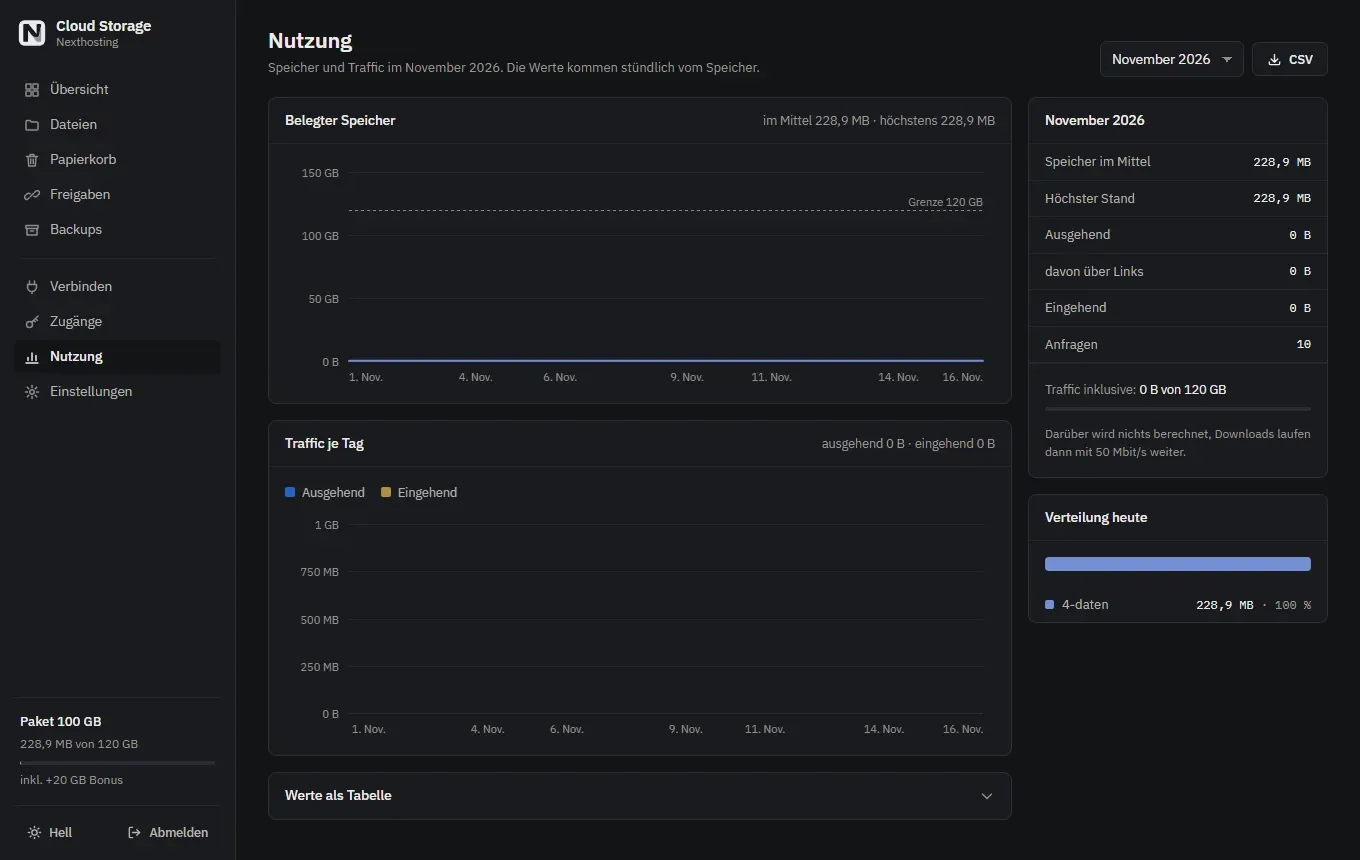
The Usage page shows storage and traffic per day and the month at a glance.
- Choose a month and download the values as CSV
- Used storage (Belegter Speicher) with the limit of your plan
- Traffic per day (Traffic je Tag), outgoing and incoming
- Traffic included (Traffic inklusive): usage compared to the included amount
- Values as table expands the numbers
When the traffic is used up
Section titled “When the traffic is used up”Nothing extra is charged. Downloads continue, throttled to 50 Mbit/s, until the end of the contract month. If you want full speed again right away, book extra traffic in the customer account or with the Book extra traffic (Zusatz-Traffic buchen) button in the panel.
| Extra traffic | Price (as of November 2026) |
|---|---|
| +1 TB permanent | €1.49 per month |
| +2 TB permanent | €2.89 per month |
| +5 TB permanent | €6.99 per month |
| +10 TB permanent | €12.99 per month |
| +1 TB one-time, for the current contract month | €1.99 |
A larger plan also brings more included traffic. How a plan change is billed is explained in Change plan and upgrades.
You can get an early warning: from 80 % the panel points out your usage calmly, and with a custom alert you are notified before the traffic runs low.
Flex: billing by usage
Section titled “Flex: billing by usage”Flex is a plan without a fixed storage limit for changing needs. It is enabled on request, via the form on the shop page. Billing is monthly, and each invoice comes with a usage statement as a PDF with the values per day.
| Item | Price (as of November 2026) |
|---|---|
| Base price, including 1 TB storage and 1 TB traffic | €9.99 per month |
| Storage above that | €8.90 per TB-month |
| Traffic above that | €1.49 per TB |
For Flex we need your full address (name, street with house number, postal code, city, country). If it is missing, the customer account asks for it.
Spending limit
Section titled “Spending limit”So that there are no surprises, Flex has a spending limit. Your usage may cost at most this amount per month. At 80 % you get an email, and at 100 % uploads are paused until the month changes. On the Usage page, “Billing so far (Abrechnung bisher)” shows what has accumulated so far and how much of the limit is used. The usage appears on your next contract invoice.
Nexthosting sets the limit for you. It starts at €50 per month. It rises by itself to €150 once you have paid at least €100, and to €500 once you have paid at least €400 (as of November 2026). Only paid invoices that are at least 56 days old count. If you need more sooner, send us a ticket. The current limit is under Settings (Einstellungen), Spending limit (Ausgabenlimit).
Everyday limits
Section titled “Everyday limits”| What | Limit |
|---|---|
| Name of a bucket | 3 to 63 characters, lowercase letters, digits, hyphens, must not start with nh-; unique across all customers |
| Number of buckets, accesses | at most 100 buckets and 50 active access keys per customer, regardless of the plan; up to 20 open invitations per bucket |
| Custom alert rules | up to 20 rules, up to 10 targets |
| Allowed websites | up to 10 per bucket |
| Share links of new accounts | at most 24 hours, longer times possible afterwards |
| Windows drive (WebDAV) | files up to 50 MB, for larger ones use rclone or RaiDrive |
| Trash | 7 days, with an upper limit (see Trash) |
If an invoice stays unpaid
Section titled “If an invoice stays unpaid”- Two days after the due date: The storage is locked completely. Uploading, downloading, S3, SFTP, WebDAV and share links are paused. The files stay.
- Payment booked: Everything works again immediately, including accesses, drives and share links.
- After ten days without payment: The contract ends and the files are deleted.
Flex has two more kinds of invoice: an interim invoice when the running usage exceeds €250, and a final invoice when the contract ends. Both are collected through your stored payment method. If one of them stays open, after the due date: reminders on day 1 and day 7, full lock from day 14. The usage on the normal contract invoice follows the process above instead.
You get reminders by email beforehand. The general process is explained in Late payment and lock. The binding terms are the General Terms and Conditions and the Add-on terms.
Cancel and change plan
Section titled “Cancel and change plan”You cancel monthly, and you can switch to a larger plan at any time in the customer account. In the panel, Change or cancel plan (Paket ändern oder kündigen) under Settings takes you there. At the end of the term all files are deleted. We remind you by email seven days and one day beforehand. More in Contracts and cancellation.
Frequently asked questions
Section titled “Frequently asked questions”Does my storage immediately get more expensive when I exceed it?
Section titled “Does my storage immediately get more expensive when I exceed it?”Not with the fixed plans: when the storage is full, only new uploads stop working. Upgrade the plan or delete files. With Flex, on the other hand, the bill grows with usage, capped by your spending limit.
Do server backups count toward my storage?
Section titled “Do server backups count toward my storage?”No. The backups of your game servers and VPS are included in the server price and do not count toward your storage.
Does uploading count toward traffic?
Section titled “Does uploading count toward traffic?”No, only downloads.
Why are my downloads suddenly slow?
Section titled “Why are my downloads suddenly slow?”Probably the traffic for this contract month is used up. Downloads then run at 50 Mbit/s until the end of the month. Extra traffic lifts this immediately.