

02Account & billing
Transfer a server – hand a game server, VPS or dedicated server to another account
Hand a server over to someone else or take one over: change the owner, transfer the contract to another customer account, invitation by email, what happens to invoices, data and access, deadlines and withdrawal.
In short
You can transfer a game server, VPS or dedicated server, with its contract and data, to another Nexthosting account. You start the transfer with the Transfer server button and confirm it with your password. The recipient gets a link by email and has to expressly accept in their customer account. Only then does the server change owner, usually within a few seconds. The period already paid goes with it, and the recipient gets the invoices from that point on. There is no fee.
When you need this
Section titled “When you need this”- You are passing your game server on to someone in your community instead of cancelling it.
- A project changes its person in charge, and the server should now run on their bill.
- You set up a VPS or dedicated server for someone else and now want to hand it over completely.
If someone should only work with you and the contract should stay with you, a transfer is the wrong tool. Use Share a server (VPS) and subusers in the game server panel instead.
Which servers can be transferred
Section titled “Which servers can be transferred”| Product | Transfer possible? |
|---|---|
| Game server | Yes |
| VPS | Yes |
| Dedicated server | Yes |
| Event server | No |
| Web hosting, WordPress, email package | No (mailboxes and website data often belong to third parties) |
| Cloud storage | No |
| Domains | No (the holder of a domain is registered with the registry) |
| Discord bots | No |
Transfers are available to all customer accounts.
How a transfer works
Section titled “How a transfer works”- Sender startsRecipient’s email, password, checkbox
- Invitation by emailLink valid for 7 days, single use
- Recipient logs inWith the account for exactly this address
- Accept or decline?Nothing changes without acceptance
- accepted
- ExecutionUsually a few seconds
- Server with the recipientBoth get an email and a confirmation (PDF)
Until it is accepted, the server stays yours. If the recipient declines, you withdraw the transfer or the link expires, everything stays as it was.
As the sender: start the transfer
Section titled “As the sender: start the transfer”- Open the server:
- Game server: in the Server Center, open the game server under Server. The Contract card has the Transfer server button.
- VPS or dedicated server: open the server in the Server Center. Its overview has the Transfer server card.
- Alternatively, in the account area under Contracts, use the Transfer server link next to the contract.
- Read the overview: What is transferred and What stays with you, plus the server transfer terms.
- Enter the recipient’s email address. They need a Nexthosting account with exactly this address (they can still create one).
- Confirm with your password. If two-factor authentication is on, also enter the 6-digit code from your app.
- Tick the checkbox saying you are transferring the server with binding effect, and click Start transfer.
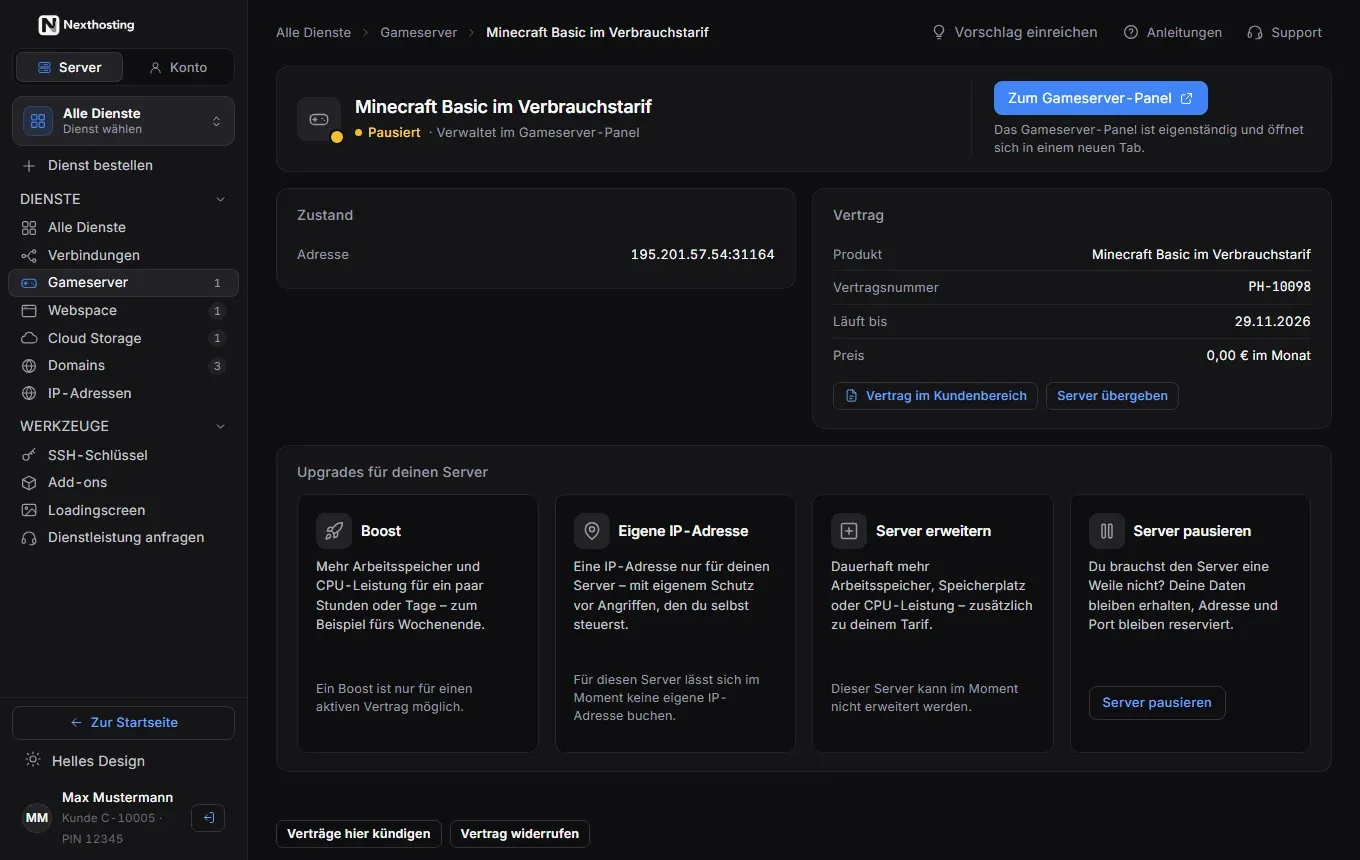
For a game server, the button is in the Contract card (shown here in German).
- Transfer server – opens the page to start the transfer
Nothing changes in the contract yet. The page now shows Transfer in progress with the address and the date until which the link is valid. There you can:
- Resend invitation – a new link replaces the old one, the deadline stays the same. This works up to three times, with at least 10 minutes in between.
- Withdraw transfer – the link stops working. You can withdraw until the recipient has accepted.
- download the Confirmation (PDF).
If you have not set a password (for example because you only log in another way), set one first. After 5 wrong passwords, confirming is locked for 15 minutes. If you are logged in to someone else’s account via Account access, you cannot transfer – only the account owner can do that.
The recipient sees your name and the server’s name in the invitation.
When a transfer is not possible
Section titled “When a transfer is not possible”If something is currently in the way, the page shows Transfer not possible right now with all the reasons. The most common ones:
| Reason | What you can do |
|---|---|
| An invoice for the contract is open or a payment is still in progress | Pay the invoice or wait |
| An invoice in your account is overdue | Settle it first, see Late payment and suspension |
| A direct debit payment for the contract can still be returned (about eight weeks after payment) or was charged back | Wait; open a ticket if you have questions |
| The contract is still very new | Game servers and VPS at the earliest 14 days, dedicated servers 30 days after ordering |
| The contract ends in less than 3 days | It is no longer possible this close to the end |
| Contract or server is locked, not active or not fully set up yet | Resolve the cause first |
| Trial or event server, server from a gift card or a community bundle | Cannot be transferred |
| The contract contains more than the server (for example a domain) | Our support team handles this manually, open a ticket |
| Booked add-on (game server: boost, own IP address, extension waiting for payment, Server Center add-on; VPS/dedicated: backup, maintenance, Server Watch, DDoS Protection Plus, Windows license, managed support) | End it first; additional IPv4 addresses may stay and go with the server |
| Game server paused, stored or part of a cluster | Resume it or take it out of the cluster first |
| VPS/dedicated: cancelled, plan change requested, move in progress, job running (reinstallation, backup, template), rescue system or emergency console open | Revoke the cancellation, wait, or end it |
| VPS/dedicated: in a private network, connected to domains or with mail ports unblocked | Remove it from the network, disconnect the domains; open a ticket for mail ports |
| A withdrawal or cancellation request for the contract is being processed | Wait |
| You already have 3 open transfers | Wait until one is completed |
A cancelled game server can be transferred as long as the contract end is at least 3 days away. The cancellation goes with it; the recipient sees it clearly and can revoke it on the contract page after the takeover. A cancelled VPS or dedicated server, on the other hand, cannot be transferred.
As the recipient: take over the server
Section titled “As the recipient: take over the server”- Open the link from the email Invitation: take over …. The page shows who the invitation comes from and until when it is valid.
- Click Log in or Create account – with exactly the email address the invitation was sent to. You then continue automatically. If not, just open the link from the email again.
- Read the Take over server page calmly. It has five steps:
- Server and resources – memory, storage, CPU, current owner
- Paid period and invoices – until when it is paid, when the next invoice comes and for how much, notice period, a scheduled cancellation
- What happens when – the timeline from your acceptance
- Payment method – whether one is on file; for prepaid contracts you can turn on automatic renewal
- Accept – two checkboxes (takeover and terms), then Take over server
- If you do not want the server, click Decline. You can also decline without an account directly on the link page (I do not want to take over this server).
After you click Take over server, the transfer starts right away and usually takes only seconds. Then you see The server is yours now, and the server is in your Server Center. You get an email and a confirmation as a PDF.
Accepting is blocked if:
- you are logged in with an account whose email address is not the one the invitation went to – log in with the right account or ask the sender for a new invitation to your account address,
- your account is missing a complete address (add it under Settings),
- an invoice in your account is overdue or your account is locked,
- you are in someone else’s account via Account access,
- it is your own server.
A payment method on file is not required to accept, but it makes paying the next invoice easier.
What is transferred and what stays
Section titled “What is transferred and what stays”| Game server | VPS | Dedicated server | |
|---|---|---|---|
| Contract with term, price, notice period | goes with it | goes with it | goes with it |
| Period already paid | goes with it | goes with it | goes with it |
| Data on the server | all worlds, files, settings and backups | all data, backups and IP addresses | all data and IP addresses |
| Settings | settings, schedules and the server page in the game server panel | additional IPv4, firewall, Server Center settings | additional IPv4, Server Center settings |
| Balance, payment methods, the sender’s other contracts | stay with the sender | stay with the sender | stay with the sender |
| Previous invoices | remain the sender’s records | remain the sender’s records | remain the sender’s records |
Invoices and money
Section titled “Invoices and money”- The period already paid stays with the server. The recipient pays nothing to Nexthosting for it.
- The sender gets no refund for the period already paid. Whatever you agree between yourselves is your own business; Nexthosting is not a party to it.
- From execution on, all invoices for this contract go to the recipient. Previous invoices stay with the sender.
- If the sender later reverses a payment (direct debit return, card chargeback), the claim stays with the sender.
- The sender’s automatic renewal no longer applies. For prepaid contracts, the recipient can turn it on themselves when accepting. How it works is described under Balance and automatic renewal.
- Any choice the sender made about the return backup no longer applies; the default setting applies to the recipient.
Access after the transfer
Section titled “Access after the transfer”Game server
- The sender loses all access: customer area, game server panel, file access (SFTP) and console.
- All subusers of the server are removed.
- The passwords of the server databases are reset. If a plugin or script uses a database, the recipient enters the new password there (game server panel > Databases).
- The recipient uses their own account in the game server panel. They open it like any of their servers, see Open the game server panel.
- In-game admin lists, notifications and schedules come from the previous owner – the recipient checks them once.
VPS and dedicated server
- The sender loses access through Nexthosting: customer area and Server Center. Server shares with other accounts end.
- The sender had root access to the system. They know the root password and may have left SSH keys, users or programs behind. Nexthosting can neither see nor remove these.
- VPS: When accepting, Reset the root password on takeover (recommended) is ticked. The server restarts once, and nobody knows the new password. Afterwards the recipient sets their own in the Server Center (Access > Reset root password).
- Dedicated server: The root password cannot be reset from outside. The password stored with the contract is the sender’s. The recipient changes it right away themselves (command
passwd). - Only a reinstallation removes all of the sender’s access – it deletes all data. If you do not fully trust the previous owner, reinstall, see Secure your VPS.
- A custom reverse DNS entry of the sender stays in place until the recipient changes it in the Server Center under Network. The sender sees a notice beforehand and can change it themselves.
Withdrawal by the recipient
Section titled “Withdrawal by the recipient”If the recipient is a consumer (no company is entered in their account), they can withdraw the takeover within 14 days of execution without giving reasons:
- in the customer account on the Take over server page with Withdraw takeover,
- via Withdraw from contract at the bottom of every page of the shop (Withdrawal), or
- by email to support@nexthosting.net.
The contract then goes back to the sender as it existed before the transfer – with the data that is on the server at that point. The sender agreed to this reversion when starting the transfer. Nexthosting refunds the recipient everything they paid for this contract since the takeover, no later than 14 days after receiving the withdrawal. Both get an email.
A VPS or dedicated server that has been taken over can only be passed on by the new owner once the minimum period since the takeover has passed.
Deadlines at a glance
Section titled “Deadlines at a glance”- Before startingContract old enoughGame servers and VPS 14 days, dedicated servers 30 days after ordering; contract end at least 3 days away
- Day 0Transfer startedInvitation by email, the sender can withdraw
- Up to day 7Accept or declineAfter that the link expires and nothing changes
- AcceptanceExecutionUsually a few seconds, both get an email and PDF
- 14 days laterEnd of the withdrawal periodOnly for recipients who are consumers
Security and records
Section titled “Security and records”- Starting is only possible with your password (and the two-factor code, if it is active).
- Accepting is only possible with the link from the email and an account with exactly this address. Anyone who creates an account with a different address cannot take over anything without the link.
- Every step is logged with its time. Sender and recipient get a confirmation as a PDF with the name or company and customer number of both sides, the contract and the log.
- If an invitation looks strange to you, decline or ignore it. Nothing happens without your acceptance. We never ask for your password by email.
If the execution does not work right away (for example because the game server panel is briefly unavailable), the system retries automatically. If our support team needs to check it, you see Transfer in progress with a note, and the server stays with the sender until then.
Frequently asked questions
Section titled “Frequently asked questions”Does a transfer cost anything? No. There is no transfer fee.
Does the recipient have to be a customer already? No. They can create an account via the link – with exactly the address the invitation went to.
Can I correct a wrong address? Withdraw the transfer and start it again with the right address.
Can I go back after acceptance? Not as the sender. Only a recipient who is a consumer can withdraw within 14 days.
Do I get money back as the sender? No. The period already paid goes to the recipient together with the server.
Where are the legal details? In the Terms and Conditions in the section on the transfer of contracts to other customers (server transfer) and in the server transfer terms you see when starting and accepting.